Apache Flink CEP (Complex Event Processing) is one of the most powerful pattern detection capabilities in stream processing — and one of the hardest to use. This article explains what Flink CEP is, how MATCH_RECOGNIZE works, and how Nussknacker's visual editor makes building Flink CEP patterns accessible without writing raw SQL. Includes a complete example detecting flight patterns on live data.
What is Apache Flink CEP?
Apache Flink CEP detects meaningful sequences of events in real-time data streams. Unlike regular stream processing — which filters, aggregates, or enriches individual events — Complex Event Processing looks for patterns across multiple events over time.
Did an aircraft descend below a certain altitude, continue descending for several reports, then touch the ground? That's a landing. Did it descend, then suddenly climb again without touching down? That's a go-around. These are event sequences — and detecting them in real time is exactly what Complex Event Processing is built for.
Flink implements Complex Event Processing through the MATCH_RECOGNIZE clause in Flink SQL. You define pattern variables (states), specify the sequence they should appear in, set conditions for each state, and extract results when a full match is detected. It works like regular expressions, but applied to event streams instead of text.
As Kai Waehner recently wrote, CEP in Apache Flink is one of the most powerful but underused capabilities in the Apache Flink ecosystem. The reason is simple: it's hard to use.
The problem with Flink CEP: powerful but painful
Writing a Flink Complex Event Processing query with MATCH_RECOGNIZE means dealing with SQL that can quickly grow to dozens or hundreds of lines. Here's what a single go-around detection pattern looks like in raw Flink SQL — 46 lines, and this is just one of three patterns in our example scenario:
SELECT *
FROM (
  SELECT
    uniqueFlightRecord.baro_altitude AS baro_altitude,
    uniqueFlightRecord.callsign AS callsign,
    uniqueFlightRecord.latitude AS latitude,
    uniqueFlightRecord.true_track AS true_track,
    uniqueFlightRecord.last_contact AS last_contact,
    uniqueFlightRecord.on_ground AS on_ground,
    uniqueFlightRecord.position_source AS position_source,
    uniqueFlightRecord.vertical_rate AS vertical_rate,
    uniqueFlightRecord.icao24 AS icao24,
    uniqueFlightRecord.time_position AS time_position,
    uniqueFlightRecord.category AS category,
    uniqueFlightRecord.sensors AS sensors,
    uniqueFlightRecord.velocity AS velocity,
    uniqueFlightRecord.geo_altitude AS geo_altitude,
    uniqueFlightRecord.longitude AS longitude,
    uniqueFlightRecord.squawk AS squawk,
    uniqueFlightRecord.origin_country AS origin_country,
    uniqueFlightRecord.spi AS spi,
    record_time
  FROM record
)
MATCH_RECOGNIZE (
  PARTITION BY icao24
  ORDER BY record_time
  MEASURES
    A.icao24 AS aircraft,
    A.callsign AS callsign,
    FIRST(A.record_time) AS descent_start,
    FIRST(A.baro_altitude) AS altitude_at_start,
    LAST(B.record_time) AS lowest_point_time,
    LAST(B.baro_altitude) AS lowest_altitude,
    LAST(B.latitude) AS abort_lat,
    LAST(B.longitude) AS abort_lon,
    D.record_time AS climb_confirmed_time,
    D.baro_altitude AS altitude_after_climb
  ONE ROW PER MATCH
  AFTER MATCH SKIP PAST LAST ROW
  PATTERN (A B{1,} C{2,}? D)
  DEFINE
    A AS A.on_ground = FALSE
      AND A.vertical_rate < -1.0
      AND A.baro_altitude < 1500,
    B AS B.on_ground = FALSE
      AND B.vertical_rate < -1.0
      AND B.baro_altitude < 800
      AND (LAST(B.baro_altitude, 1) IS NULL
           OR B.baro_altitude < LAST(B.baro_altitude, 1)),
    C AS C.on_ground = FALSE
      AND C.vertical_rate > 2.0,
    D AS D.on_ground = FALSE
      AND D.baro_altitude > LAST(C.baro_altitude)
) AS match_result
The first 20 lines are pure boilerplate — mapping input fields. The actual Flink CEP pattern logic starts halfway through. And you still need to understand greedy vs reluctant quantifiers, handle NULL guards for functions like LAST(), manage append-only vs changelog mode, and debug with no visibility into what's happening inside the match.
There is no built-in way to test a Flink Complex Event Processing pattern against sample data. There is no way to preview intermediate states. If something doesn't match, you're left staring at 46 lines of SQL trying to figure out which condition failed.
We've written extensively about why Streaming SQL is not the right tool for building complex event-driven applications. SQL was designed for tables, not for stateful, time-sensitive logic with branching, scoped variables, and complex conditions. And yet, MATCH_RECOGNIZE is genuinely useful — too useful to ignore.
What is Nussknacker?
Nussknacker is an open-source, low-code streaming IDE for Apache Kafka and Apache Flink. It lets domain experts and developers build event-driven applications visually — without writing code.
Instead of programming Flink jobs in Java or Scala, you design scenario graphs in the browser. Each node in the graph performs an operation: reading from Kafka, filtering, enriching with external APIs or databases, branching, aggregating over time windows, calling ML models, or writing results to Kafka, databases, or HTTP endpoints.
Nussknacker provides contextual autocompletion, live data preview at every node, built-in testing with assertions, version history, and one-click deployment. It runs on Apache Flink for stateful stream processing or on a lightweight Kubernetes-native engine for simpler workloads.
Best of both Flink APIs
Apache Flink offers two programming models. The DataStream API gives you full control over state, timers, side outputs, and branching — but it requires Java or Scala and deep Flink expertise. The Table API and Flink SQL give you declarative power for windowing, joins, and Complex Event Processing pattern matching — but they break down when logic gets complex, and they offer limited observability and testing.
Nussknacker is built on Flink's DataStream API. The visual scenario graph gives you DataStream-level capabilities: branching, scoped variables, stateful aggregations, HTTP enrichment, AI/ML model inference, and custom logic — all without coding.
On top of that, Nussknacker implements Flink's Table API, so you can use Flink SQL where it genuinely excels — like MATCH_RECOGNIZE for Complex Event Processing, or ROW_NUMBER for deduplication — as nodes within the same scenario graph. The SQL executes inside Flink, but it's wrapped in a visual editor with templates, live previews, and testing.
You get the expressiveness of the DataStream API and the declarative power of the Table API, together, in one visual environment.
Building a Flink CEP pattern with MATCH_RECOGNIZE in Nussknacker
A MATCH_RECOGNIZE query has five key parts: input fields, pattern sequence, define conditions, match options, and output measures. Nussknacker gives each one a dedicated section in the visual editor. Let's walk through them.
Input: replacing the SELECT boilerplate
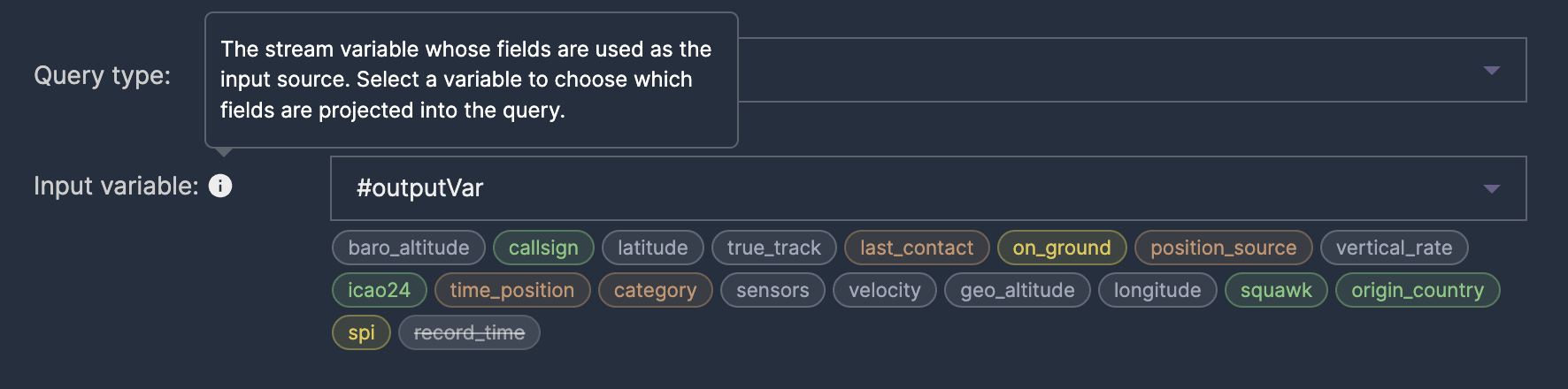
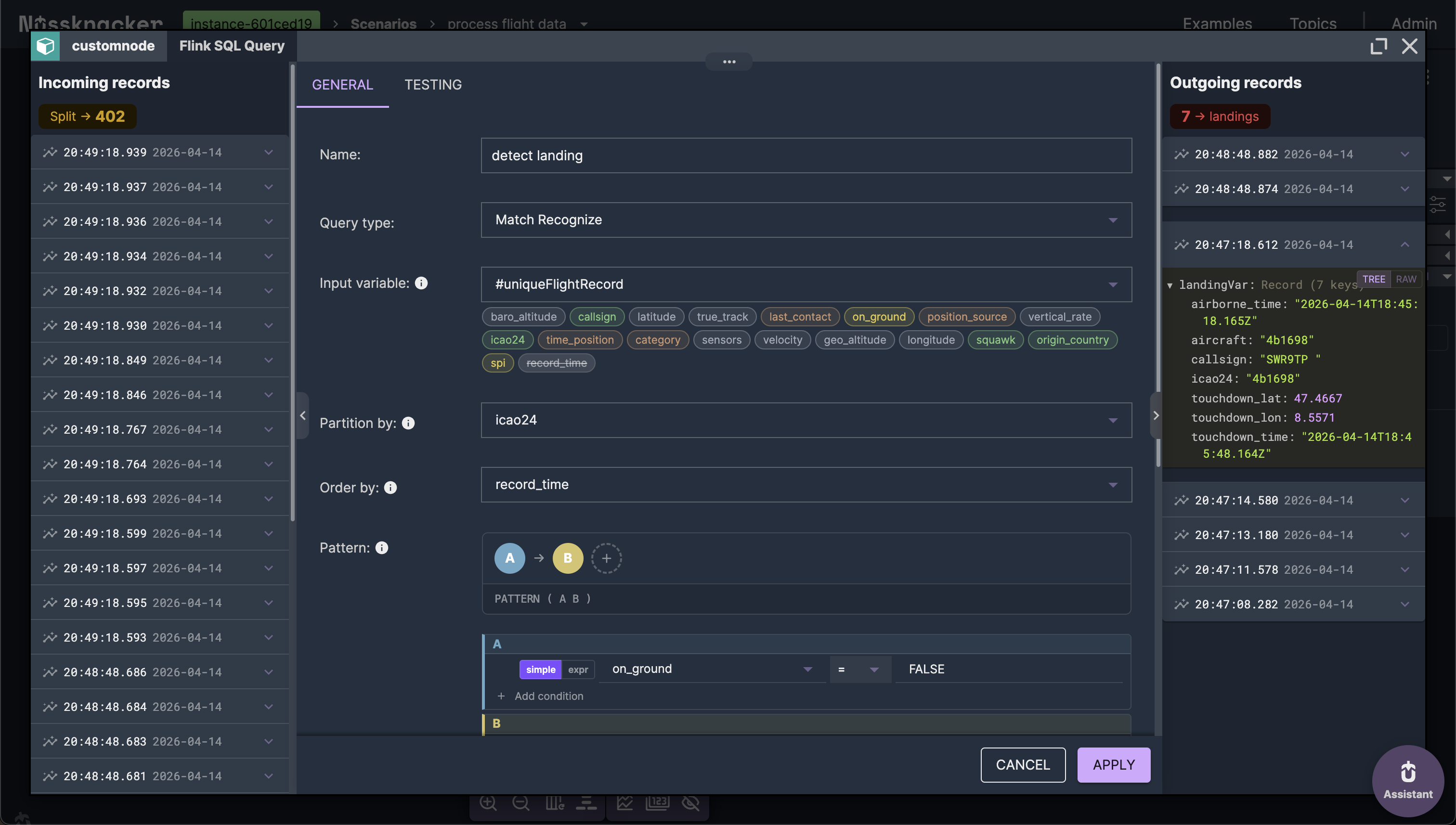
Every MATCH_RECOGNIZE query starts with a subquery that selects the fields you want to work with. In raw Flink SQL, this means writing 20+ lines of record.field AS field boilerplate. In Nussknacker, you pick an input variable from a dropdown — the editor maps all its fields automatically.
PATTERN: defining the event sequence
The PATTERN clause is the core of Flink Complex Event Processing. It describes what sequence of events you're looking for. Each letter represents a state, and quantifiers control how many events can match that state.
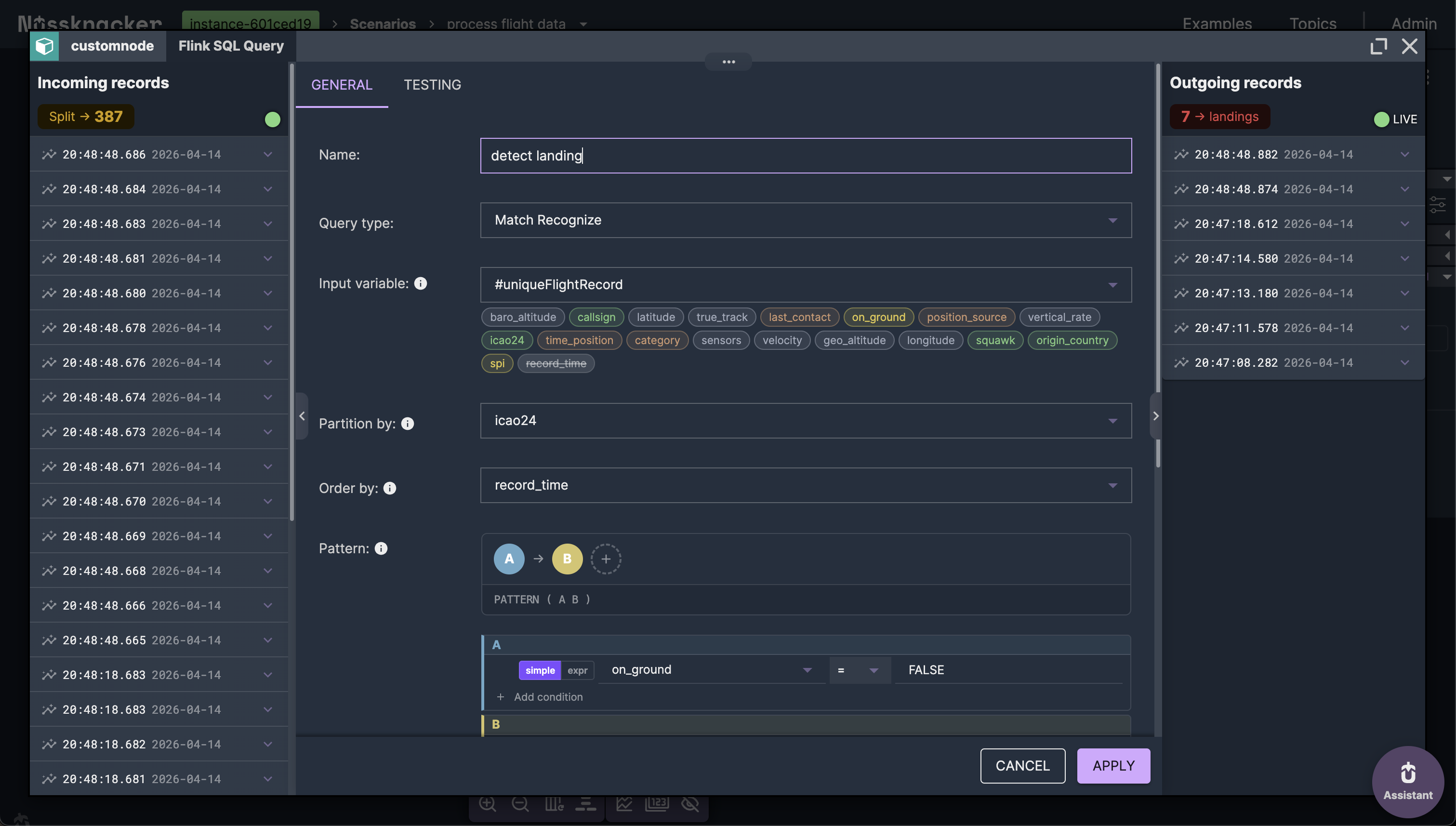
For a simple landing: PATTERN (A B) — state A (aircraft in the air), followed by state B (aircraft on the ground).
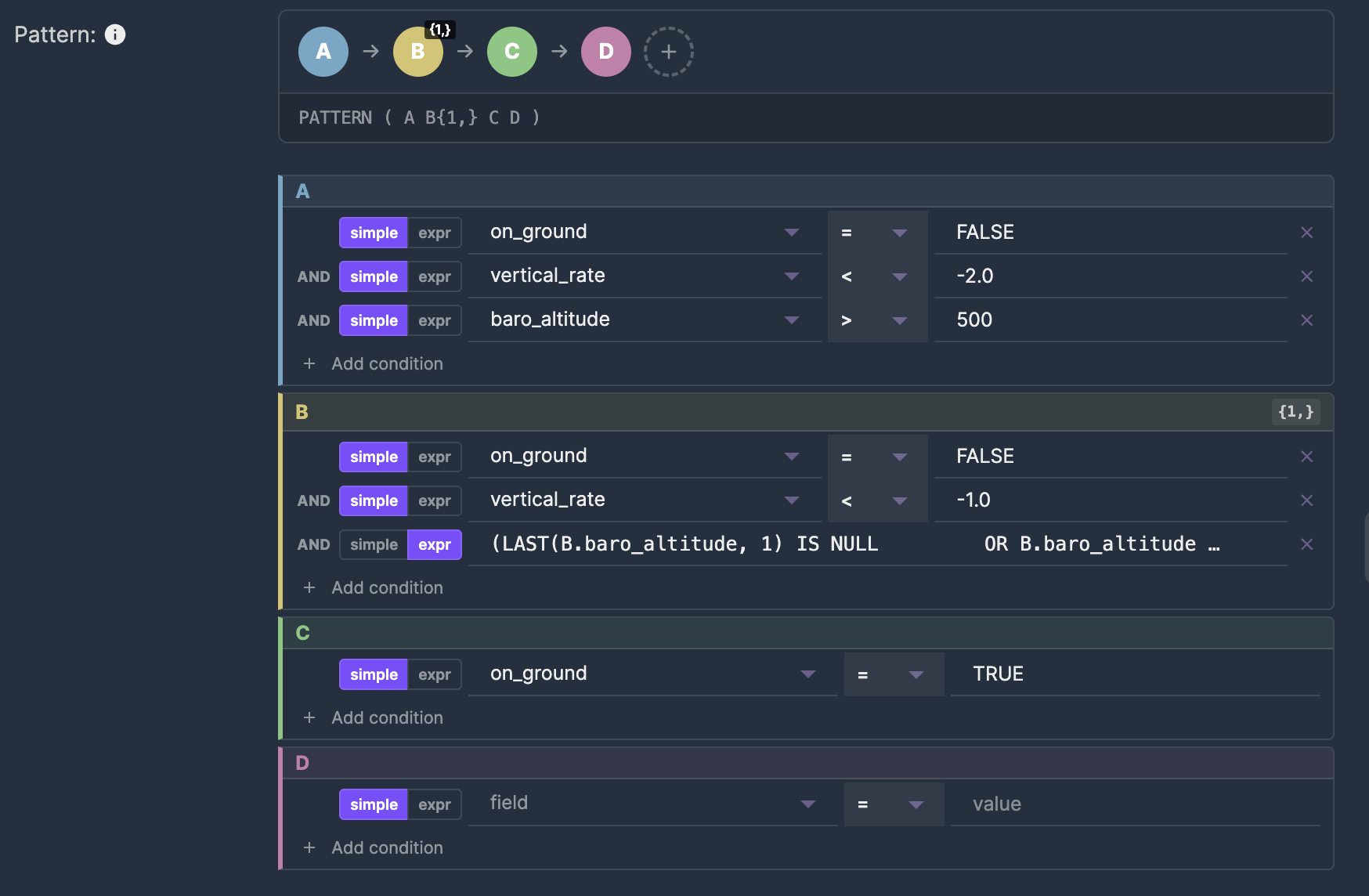
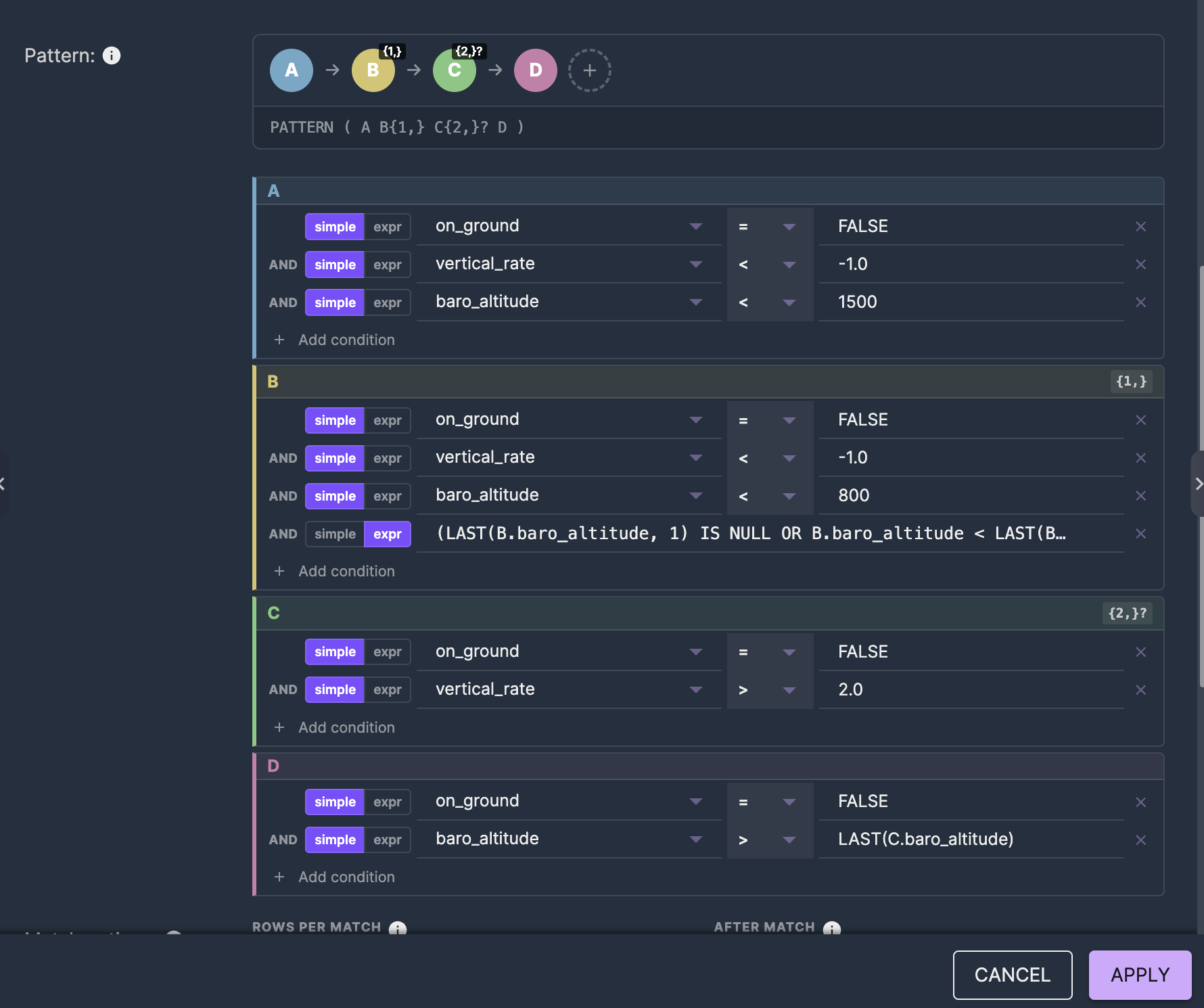
For more complex Complex Event Processing patterns like a go-around: PATTERN (A B{1,} C{2,}? D) — descending (A), continuing to descend (B, one or more events), climbing (C, two or more, reluctant), then confirmed climb (D).
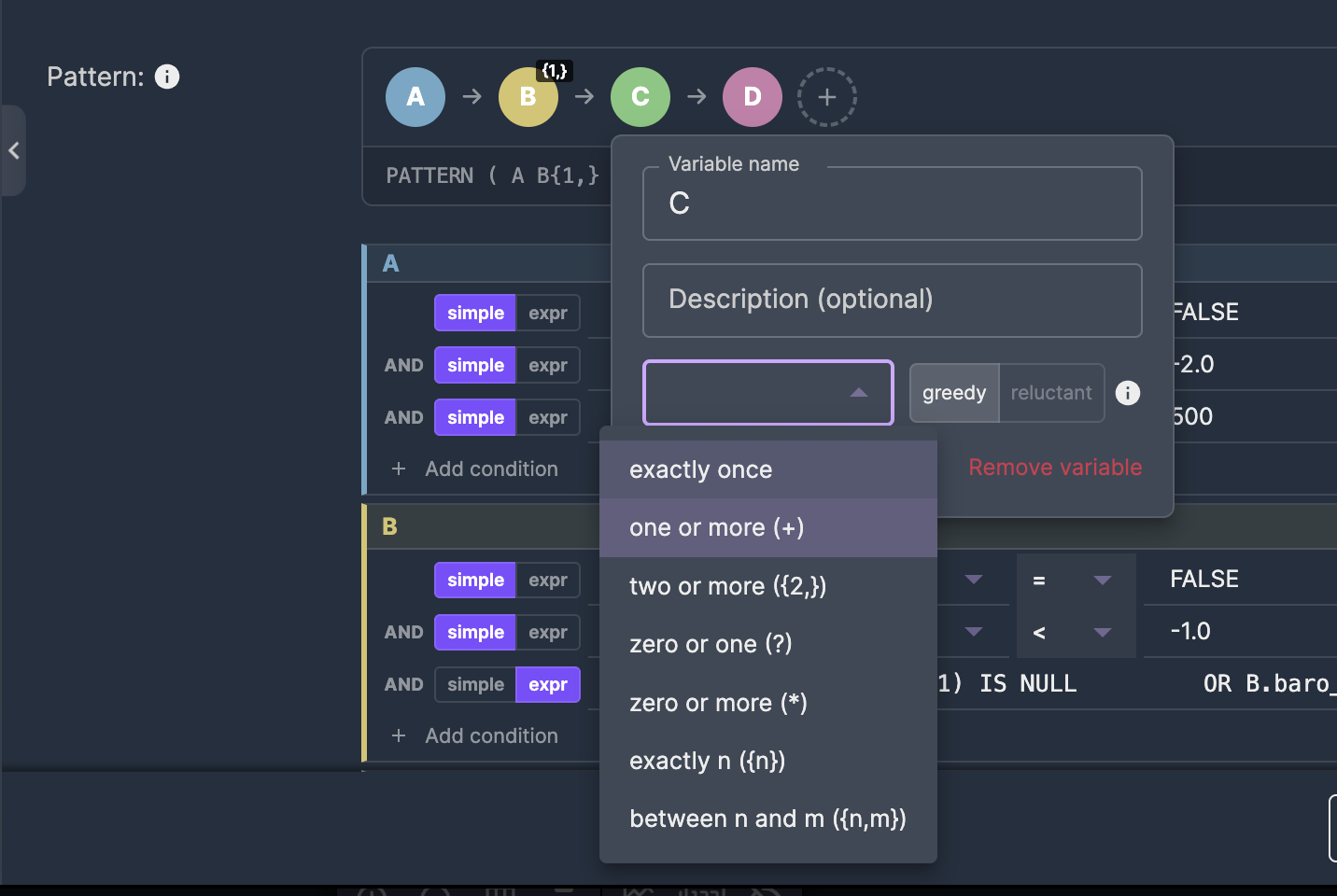
In Nussknacker, pattern variables appear as colored pills. Click a pill to set its name, quantifier, and choose between greedy and reluctant matching — no need to remember the ? suffix syntax.
Greedy vs reluctant quantifiers are one of the trickiest parts of Complex Event Processing in Flink. A greedy quantifier like {2,} tries to match as many events as possible, which can prevent subsequent states from matching. A reluctant quantifier {2,}? matches the minimum. In the visual editor, this is a simple toggle — not a character you might forget to append.
DEFINE: conditions for each state
The DEFINE clause sets the conditions that determine which events belong to which Complex Event Processing state. State A might require on_ground = FALSE and vertical_rate < -2.0. State B might require on_ground = TRUE.
Each pattern variable gets its own card in the editor. Simple conditions — like field equals value — use dropdowns. Complex conditions — like LAST(B.baro_altitude, 1) IS NULL OR B.baro_altitude < LAST(B.baro_altitude, 1) — switch to raw expression mode with one click.
This mix of simple and expression modes is important for Complex Event Processing. Most conditions are straightforward comparisons. But pattern matching often requires referencing previous events with functions like LAST(), which don't fit a simple field-operator-value structure.
Match options: controlling behavior
MATCH_RECOGNIZE has control keywords that affect how Flink Complex Event Processing emits matches and proceeds after finding one:
- ONE ROW PER MATCH vs ALL ROWS PER MATCH — emit one summary row per match, or every matched event
- AFTER MATCH SKIP PAST LAST ROW vs SKIP TO NEXT ROW — after a match, skip past all matched events, or start looking again from the next row
- WITHIN — optional time constraint limiting how long a pattern can take to complete. Essential for streaming — without it, Flink keeps state for every partially matched pattern indefinitely
These appear as dropdowns and an optional duration field in the editor.
MEASURES: extracting results from matches
The MEASURES clause defines what data gets extracted from a matched Complex Event Processing pattern. You reference pattern variables with functions like FIRST(A.record_time) for the first matched event's timestamp, LAST(B.baro_altitude) for the altitude of the last descending event, or simply C.latitude for a direct field reference.
In Nussknacker, measures become fields on the output variable. Click "Edit measures" to open a dialog where you map each output field: choose the aggregation function (FIRST, LAST, or direct), the expression, and the field name.

The result
The visual editor generates the complete Complex Event Processing MATCH_RECOGNIZE SQL behind the scenes. You can preview it anytime by expanding the Generated SQL panel — useful for learning, debugging, or copying to use elsewhere. But you never have to write or maintain it by hand.
Flink CEP example: Complex Event Processing for flight patterns on live data
To demonstrate Complex Event Processing in Apache Flink in action, we built a complete flight event processing pipeline using real-time data from the OpenSky Network — a crowd-sourced flight tracking database that provides aircraft positions, altitudes, velocities, and more via a public REST API.
The scenario architecture
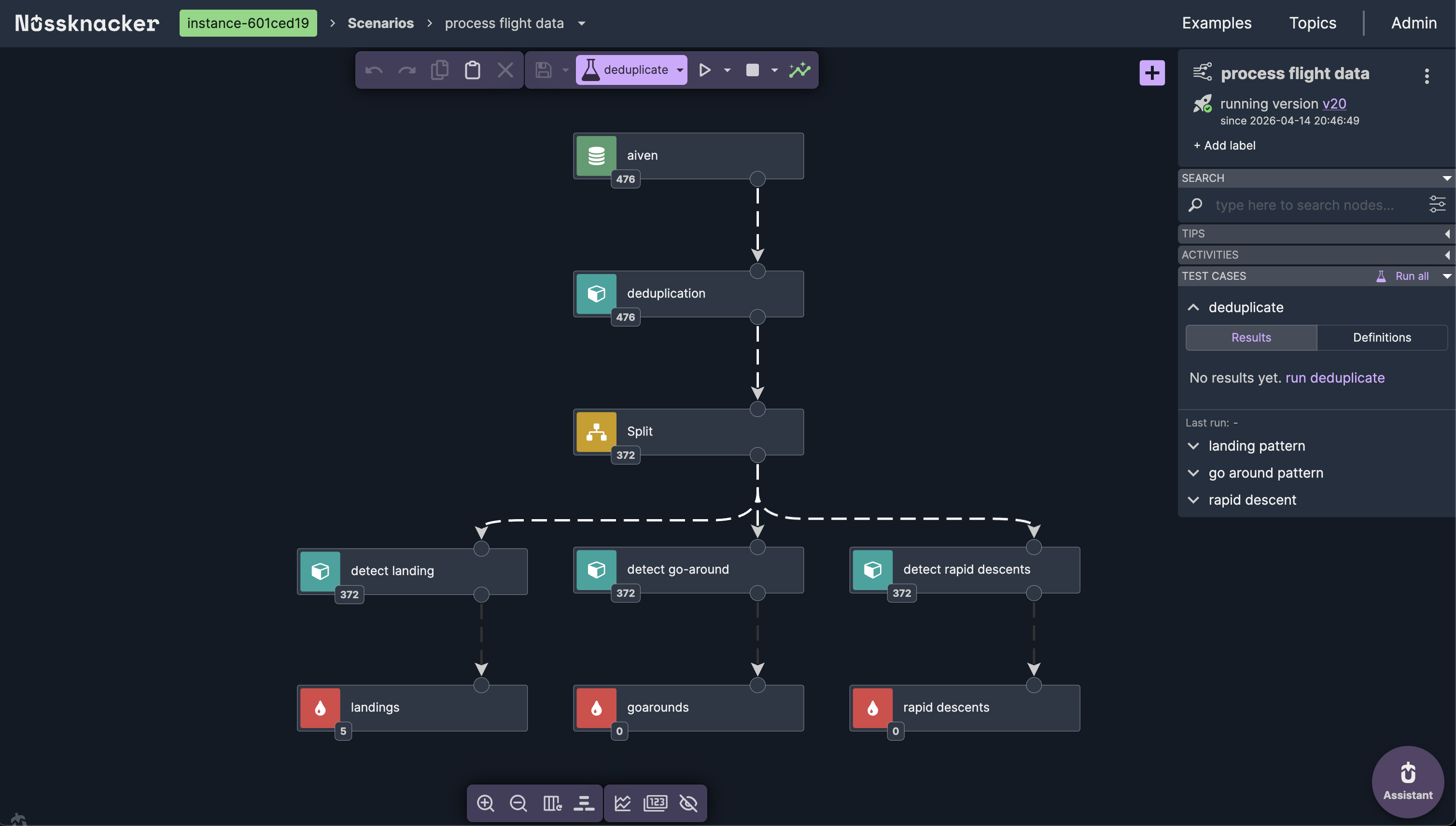
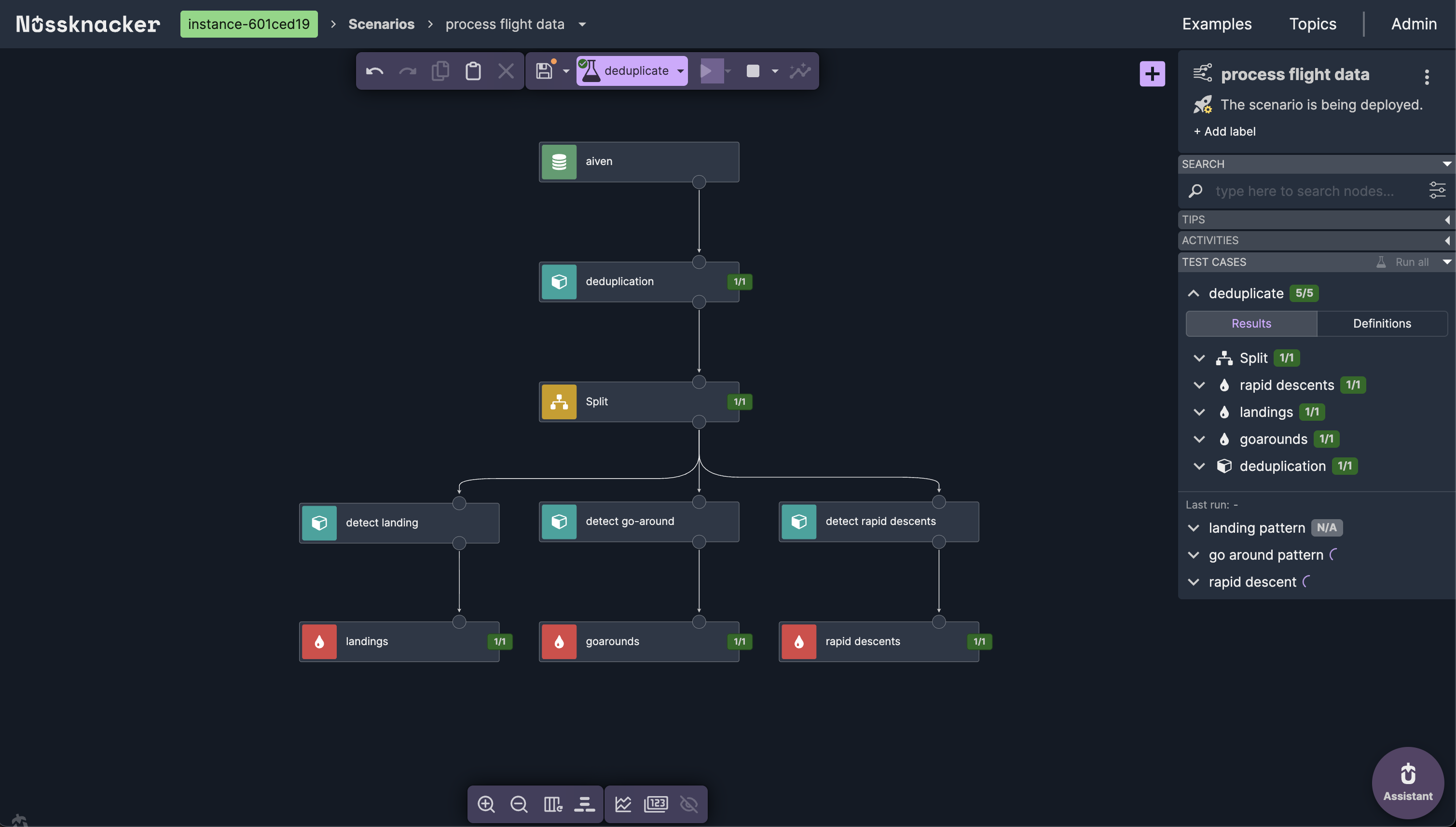
The scenario reads from a Kafka topic containing live flight data. After deduplication, a Split node fans out the stream to three parallel Complex Event Processing branches — each running a different MATCH_RECOGNIZE pattern.
Landing detection with Flink CEP
The simplest Complex Event Processing pattern: aircraft in the air (on_ground = FALSE), followed by aircraft on the ground (on_ground = TRUE), within a 3-minute window.
PATTERN (A B) WITHIN INTERVAL '3' MINUTE
DEFINE
    A AS A.on_ground = FALSE,
    B AS B.on_ground = TRUE
Output measures: aircraft ICAO address, callsign, airborne time, touchdown time, and touchdown coordinates.
Go-around detection with Flink CEP
A more complex four-state Complex Event Processing pattern: aircraft descending below 1500m (A), continuing descent below 800m with decreasing altitude (B, one or more events), then climbing (C, two or more events, reluctant quantifier), confirmed by reaching altitude above the climb phase (D).
PATTERN (A B{1,} C{2,}? D)The reluctant quantifier {2,}? on C is essential — without it, Flink's greedy matching would consume the terminal event D, preventing the Complex Event Processing match from completing. The visual editor makes this explicit: you select "two or more, reluctant" from a dropdown instead of remembering to append ? to the quantifier.
Rapid descent detection with Flink CEP
Detects altitude drops faster than 15 meters per second from above 3000 meters: initial rapid descent (A), continued descent with decreasing altitude (B, two or more events), followed by recovery where vertical rate eases above -15 m/s (C).
PATTERN (A B{2,} C)
DEFINE
    A AS A.on_ground = FALSE
      AND A.vertical_rate < -15.0
      AND A.baro_altitude > 3000,
    B AS B.on_ground = FALSE
      AND B.vertical_rate < -15.0
      AND (LAST(B.baro_altitude, 1) IS NULL
           OR B.baro_altitude < LAST(B.baro_altitude, 1)),
    C AS C.on_ground = FALSE
      AND C.vertical_rate > -15.0
The MEASURES clause computes altitude_lost as the difference between start and end altitude, giving immediate insight into the severity of the descent.
Testing Flink CEP (Complex Event Processing) patterns in Nussknacker
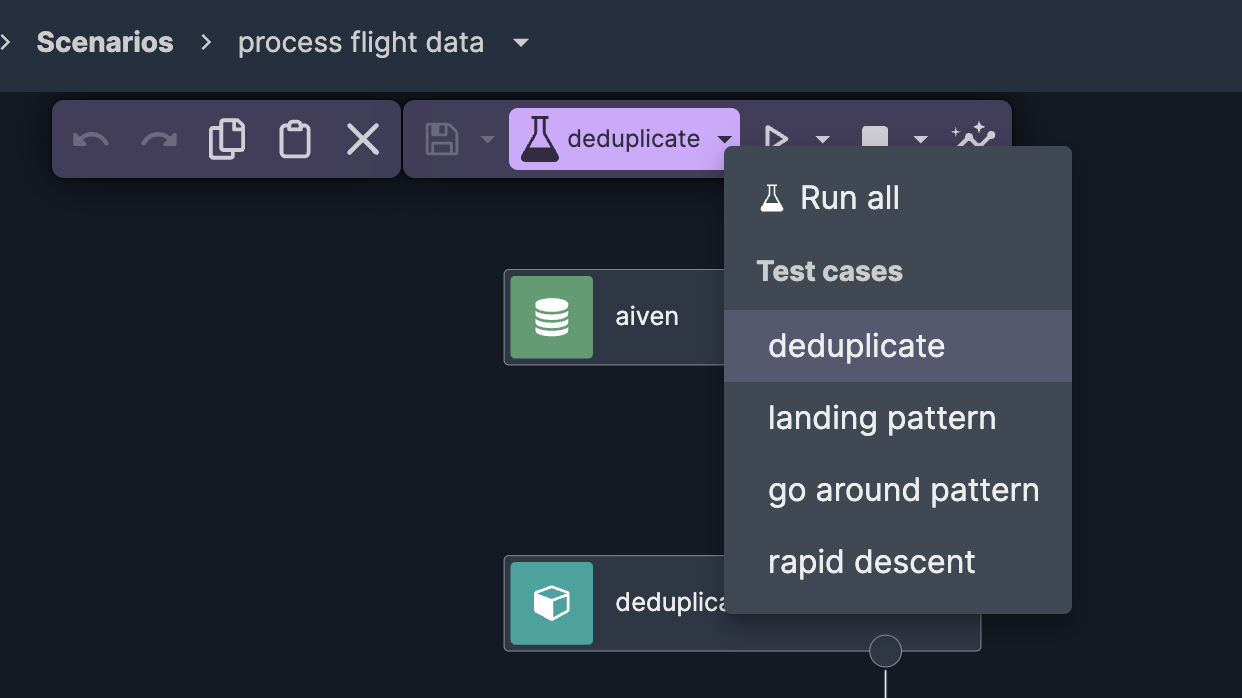
One of the biggest advantages over raw Flink SQL is built-in testing for Complex Event Processing patterns. Each pattern has its own test case with carefully crafted event sequences — a landing sequence with decreasing altitude ending on the ground, a go-around with descent followed by climb, a rapid descent with vertical rates exceeding -15 m/s.
You paste test events directly in the testing tab, add assertions (e.g., "records.size equals 1" for a single expected match), and run all test cases at once. Results show immediately — green checkmarks or failures with details.
This makes iterating on Complex Event Processing patterns fast. Change a condition threshold, re-run the test, see if the pattern still matches — in seconds, not the minutes it would take to redeploy a Flink job.
Deploy and observe Complex Event Processing in real time
With tests passing, deployment is one click. The scenario goes live on Apache Flink, processing the incoming flight data stream in real time. Nussknacker shows live event counts on each node — you can see events flowing through deduplication, splitting to three Complex Event Processing branches, and matches appearing at each sink.
Opening any node while the scenario is running shows incoming and outgoing records in real time. For the landing detection node, you can see actual Complex Event Processing matches — detected landings with aircraft callsigns, timestamps, and touchdown coordinates — live, as they happen.
When to use Nussknacker for Flink CEP
Nussknacker is a good fit when you want to:
- Build Flink CEP (Complex Event Processing) patterns using MATCH_RECOGNIZE without writing raw SQL
- Combine Complex Event Processing with other stream processing operations — enrichment, filtering, aggregation, AI/ML inference — in a single visual pipeline
- Test Complex Event Processing patterns with real event sequences before deployment
- Let domain experts — not just Flink developers — build and iterate on detection logic
- Deploy and monitor Complex Event Processing scenarios with one click, with full version history
Video walkthrough
Watch the full demo: building this Flink CEP pipeline from scratch.
Part 1 — Ingesting live flight data from OpenSky Network into Kafka:
Part 2 — Flink Complex Event Processing pattern detection with Nussknacker: