The problem: APIs are pull, streaming is push
REST APIs are everywhere. They give you access to weather data, financial feeds, IoT sensors, flight tracking, social media — almost anything. But they all work the same way: you send a request, you get a response. If you want fresh data, you poll again. For real-time applications, you need a stream. A continuous flow of events landing on Apache Kafka, ready for processing, alerting, analytics, or feeding into downstream systems. Building that bridge — from HTTP polling to a Kafka event stream — typically means writing a custom connector or microservice. It's not complex logic, but it's code that needs deploying, monitoring, and maintaining. Nussknacker lets you build this bridge visually, without writing code.
What we're building
The OpenSky Network is an open, crowd-sourced flight tracking database. Their REST API returns real-time aircraft positions, altitudes, velocities, and transponder data for any geographic bounding box. We'll turn this pull API into a push stream: poll OpenSky every 10 seconds, unpack the array of aircraft states, and write each one as a properly structured Avro event to a Kafka topic. Six nodes, no code. Nussknacker is an open-source, low-code streaming IDE for Apache Kafka and Apache Flink. You design event-driven scenarios visually — enrichment, branching, aggregation, ML inference — without writing code. It provides live data preview at every node, built-in testing with assertions, and one-click deployment.
Nussknacker doesn't replace your data platform — it sits on top of your existing Kafka and Flink infrastructure, democratizing access to real-time data for domain experts and developers alike.
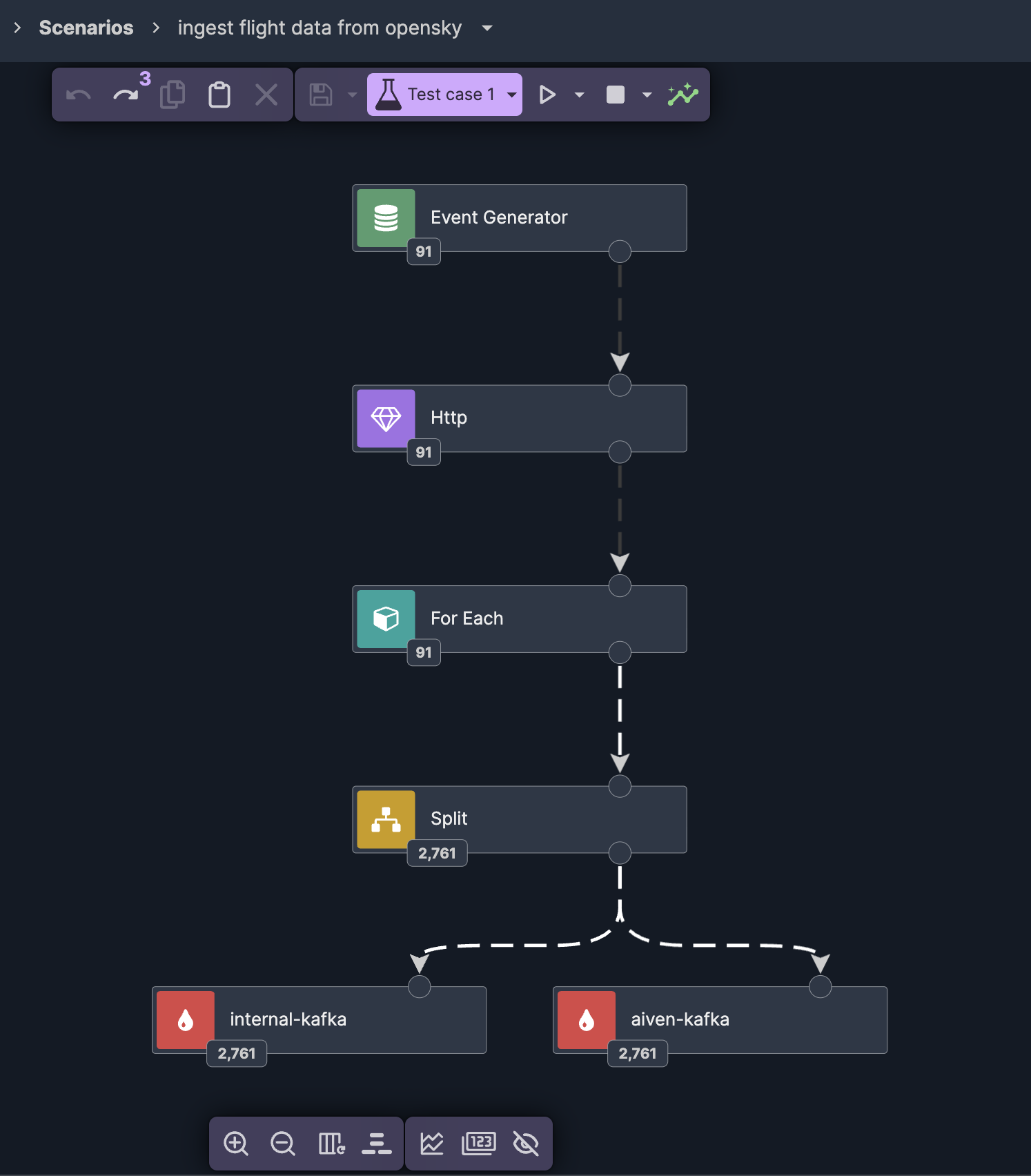
Event generator: the scheduler
Every streaming scenario needs a source. In this case, there's no Kafka topic to read from — we're creating one. Nussknacker's event generator acts as a scheduler: it fires an event at a configurable interval. We set it to every 10 seconds. Each tick triggers the rest of the pipeline.
HTTP enricher: calling the API
The event generator's output connects to an HTTP enricher. This is where we call the OpenSky API. The URL includes a bounding box — latitude and longitude coordinates defining the area we want to track. We grab the example query straight from the OpenSky documentation. The enricher calls the API and returns the full JSON response as a variable — including the states array containing all aircraft currently in the defined area.
Test with live data, then mock it
Here's where Nussknacker's development experience makes a real difference. Before building out the rest of the scenario, we run a test with a single event. The HTTP enricher calls the real OpenSky API, and we can inspect the actual response — see the structure, check the fields, verify it works. Then the key trick: we drag and drop the API response from outgoing records straight into the Mock field on the enricher. From now on, every test run uses this mock instead of calling OpenSky again. Fast iteration, no API rate limits. 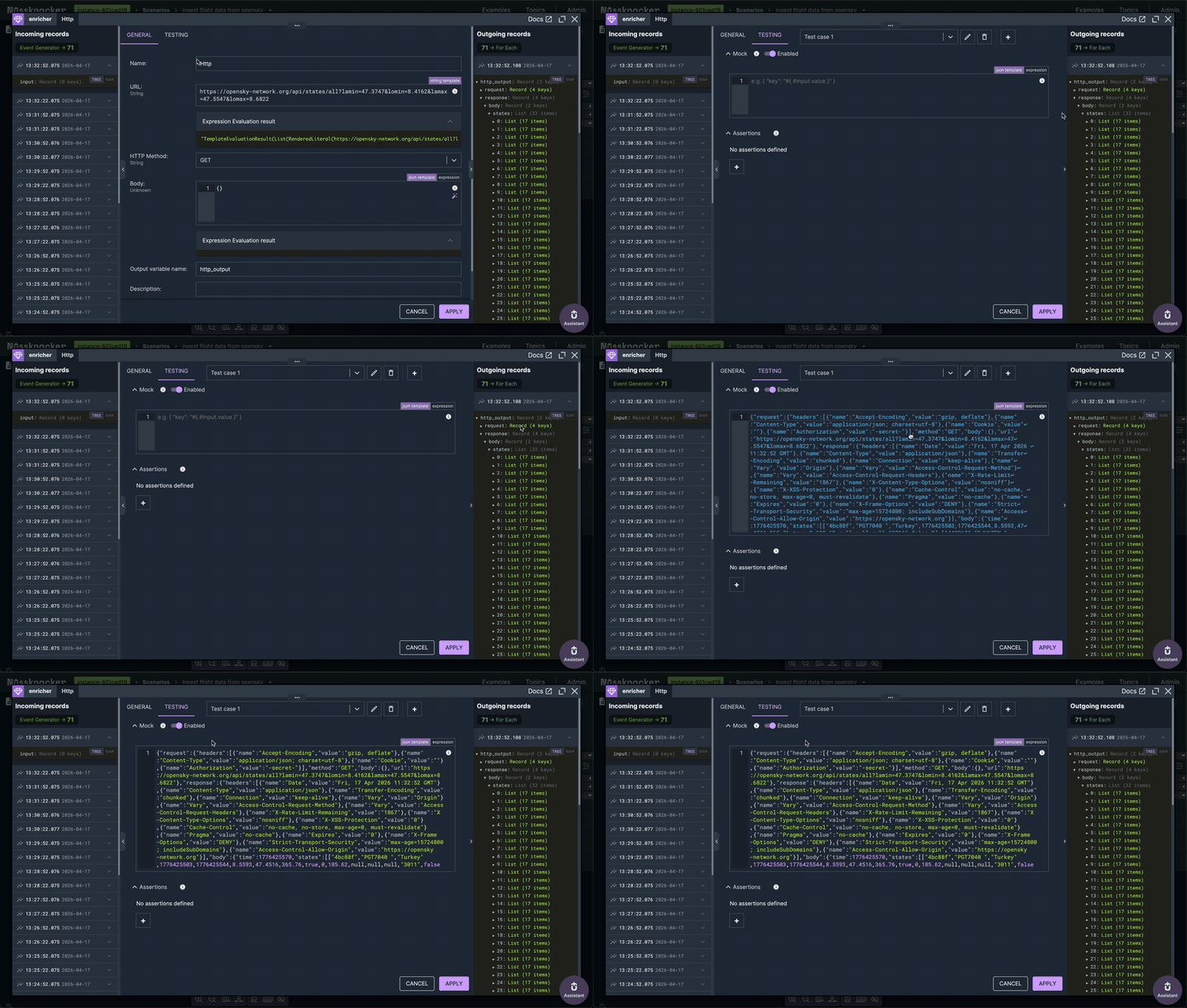
For-each: unpacking the array
OpenSky returns all aircraft in a single response as a states array. Each element is a list of 17 values — ICAO address, callsign, position, altitude, velocity, and more. We add a for-each node to iterate over this array. Using the expression builder, we select the states field from the HTTP response. Because we ran the test earlier, we can preview the actual data — seeing the list of flights we'll be iterating over. 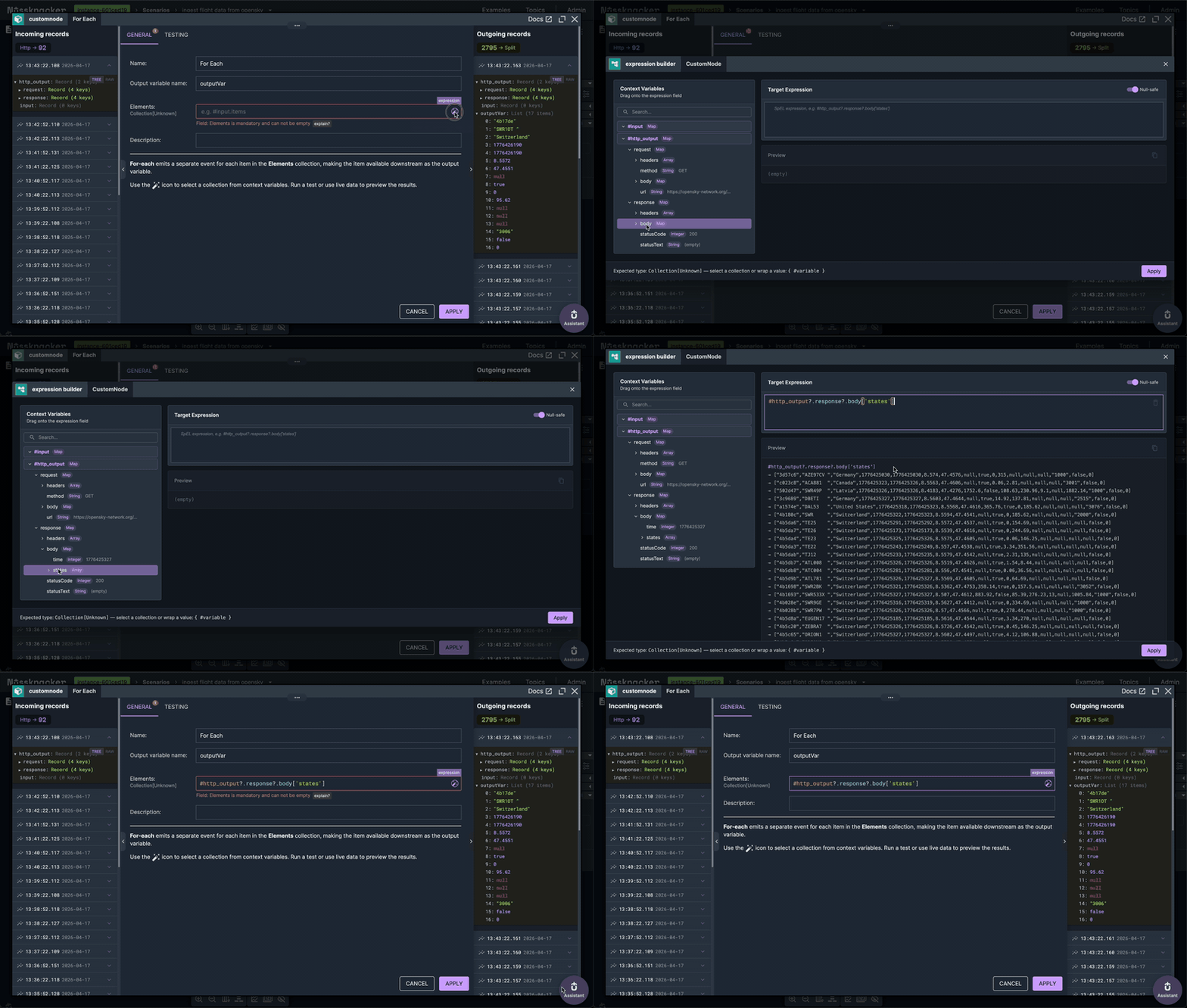
AI-generated Avro schema
Before writing to Kafka, we need a topic with a schema. The OpenSky API documentation lists all 17 fields with their types. Instead of writing the Avro schema by hand, we use Nussknacker's AI assistant — paste the field descriptions, and it generates the schema. One click to create the topic. 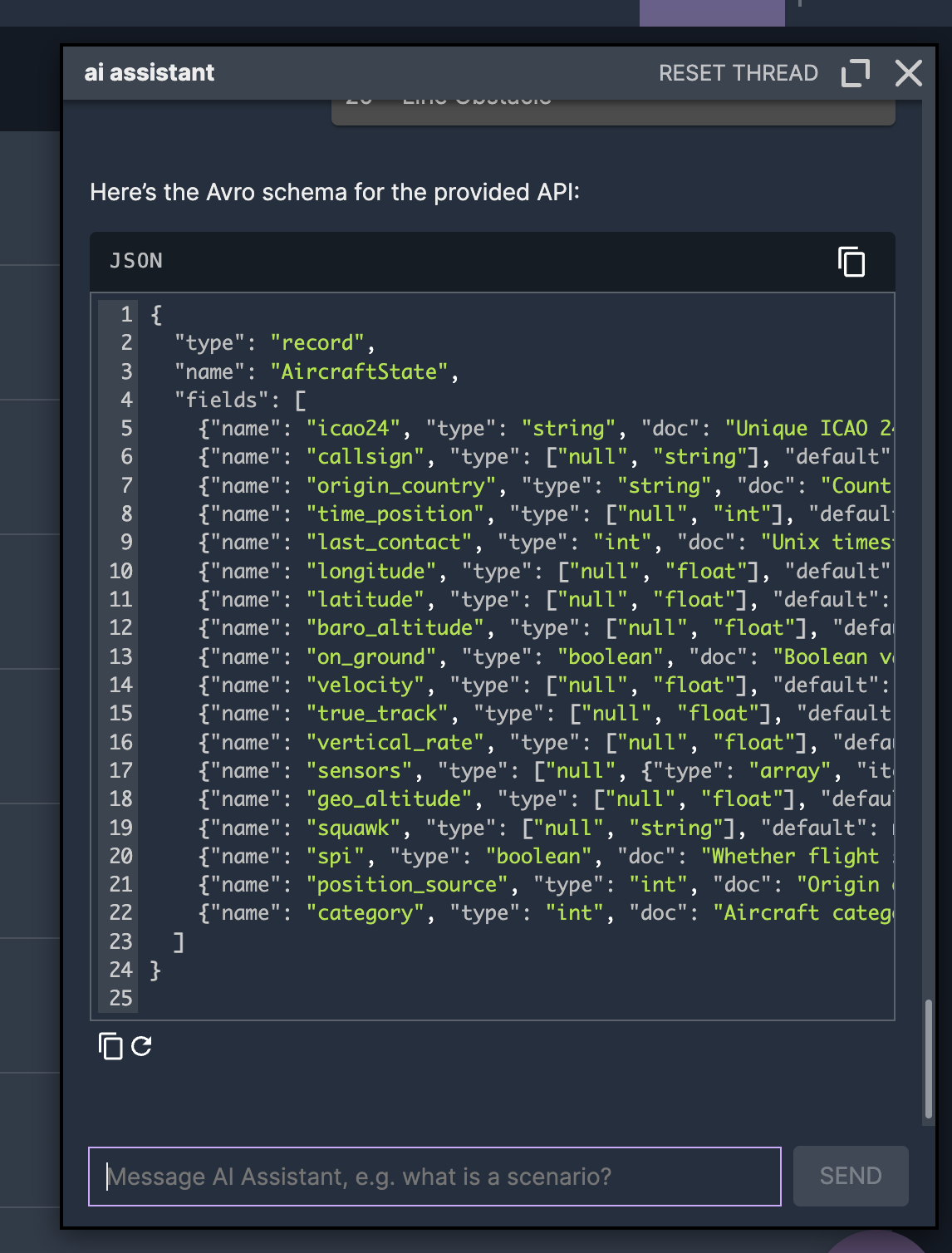
Data mapper: fields to Avro
The Kafka sink creates a form based on the Avro schema. Each field needs to be mapped from the for-each iteration variable — which is a positional array — to the named Avro fields. The data mapper lets you build these mappings visually. And because we have test data from the earlier run, you can preview actual values while mapping — see that index 0 is the ICAO address, index 5 is longitude, index 7 is barometric altitude. 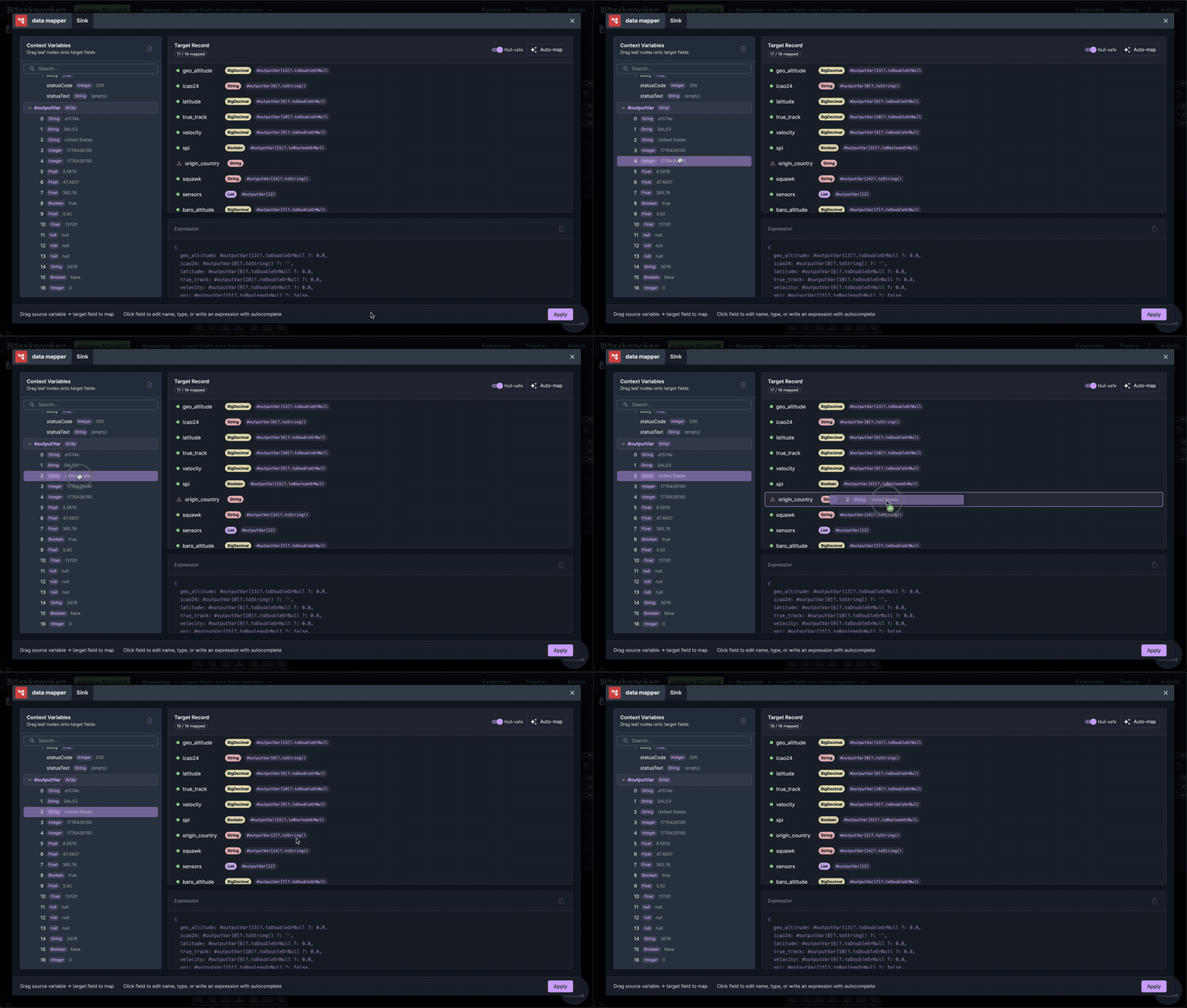
Deploy and stream
One click to deploy. The scenario starts polling OpenSky every 10 seconds, unpacking each response into individual aircraft events, and writing them to Kafka as properly structured records. We split the output to two Kafka clusters — an internal one using Avro and Aiven using JSON Schema — so the data is available in both environments. Nussknacker handles the schema format difference transparently: same data mappings, different serialization, no extra configuration. 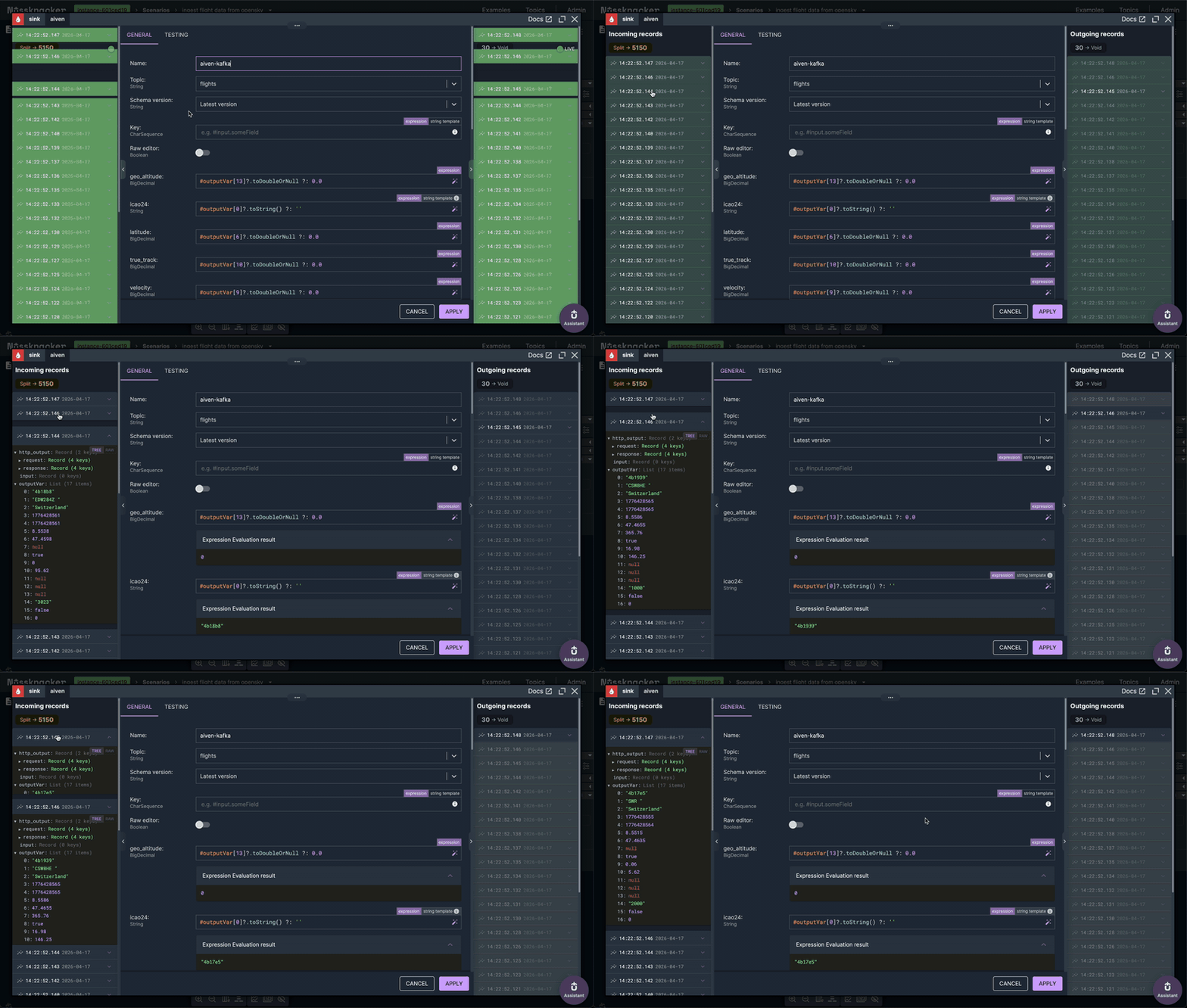 What was a pull API is now a push stream — ready for downstream processing, alerting, or analytics.
What Nussknacker brings to this
This scenario could be built with a custom script. But Nussknacker adds things that scripts don't give you:
Visual pipeline — the entire data flow is visible as a graph. Anyone on the team can understand what it does by looking at it.
Test and mock — test with live API data first, then mock it for fast iteration. No more choosing between realistic testing and not hammering external services.
Schema-agnostic output — write the same data to Avro and JSON Schema sinks with zero extra configuration. Nussknacker handles serialization transparently.
Live data preview — see actual values flowing through every node while building. No deploy-and-pray.
One-click deploy — from design to running in seconds, with version history and rollback.
What's next
This is part one of a two-part series. In part two, we take this flight data stream and build a Complex Event Processing pipeline — detecting landings, go-arounds, and rapid descents in real time using Apache Flink's MATCH_RECOGNIZE, all through Nussknacker's visual CEP editor. Read part two: Complex Event Processing with Apache Flink — Visual CEP with Nussknacker
Video walkthrough
Watch the full demo: building this flight event processing pipeline from scratch.
Part 1 — Ingesting live flight data from OpenSky Network into Kafka:
Part 2 — Processing flight data with CEP pattern detection: