What is new in Nu – August 2026
A monthly roundup of what changed in Nussknacker: components, integrations, Nu Designer, scenario authoring and running scenarios, with a short explanation of each. Our aim throughout: a shorter path from an idea to seeing its effect on real data.
Deployment Targets: one Nu Designer, many places to run scenarios
A deployment target says where a scenario is deployed and how its engine runs. Each target runs one engine, Lite or Flink, and a single Nu Designer can now work with several deployment targets at the same time. They can use different engines, run in different locations and be operated by different parties: by Nussknacker in Nussknacker Cloud, by you on your own infrastructure, or by a third party such as a managed Flink service. Your data can therefore be processed on infrastructure you control, even when Nu Designer itself runs in Nussknacker Cloud. Read more
- Choose the target when you deploy. The Deploy button lets you pick which of the configured deployment targets the scenario goes to.
- Manage targets without a restart. When the installation is configured for it, administrators can add, change, reorder and remove deployment targets in Admin Settings while Nu Designer is running. Changes take effect immediately.
- Ververica Platform. Flink scenarios can be deployed to a self-managed Ververica Platform.
- Nu Designer as a target. Both engines (Flink and Lite) can also run embedded in Nu Designer, which makes it a deployment target of its own: a quick way to develop and try out scenarios without separate infrastructure. Embedded targets are meant for development and evaluation, not production. Read more
Request-Response
- HTTP methods. The Request node has a new Method parameter: POST (the default, so existing scenarios keep working), GET, PUT, DELETE or PATCH. GET and DELETE endpoints read their input from query parameters, and the generated OpenAPI definition matches the chosen method. Read more
- Query parameters for every method. For methods with a body, query parameters are merged into #input alongside the body fields.
New component
- World Map. Draw a point, line, shape or circle on a map in Nu Designer and use the drawn geometry as data in your scenario, for example to define a delivery zone or a restricted area. Read more
- #GEO.isInsideArea. A companion SpEL helper checks whether a point lies inside an area drawn with World Map, boundary included. Read more
Scenario authoring
- Compare versions, improved. The version picker in the Compare versions dialog lists only versions with a meaningful difference from the current one, skipping layout-only changes. A tooltip shows which nodes, edges and properties changed, and each version shows its save comment next to the author and date.
- Variables after Union. Variables present with the same name and type in every incoming branch now remain available after the Union node. Read more
- See what a disabled node takes out of play. When you disable a node, the scenario graph draws it, and every part of the scenario reachable only through it, translucent. Nodes still fed by another active path stay fully visible.
- Data Mapper in its own window. The Data Mapper, which builds a record visually from the variables in context, now opens as a separate window from the Variable node, with panels for the context, the target record, the resulting expression and a sample JSON.
- Java enums and strings in SpEL. Enum values and their names can be compared and used interchangeably, and a misspelt enum name is caught during validation. Read more
- Field hints from Kafka schemas. Descriptions of fields in JSON and Avro schemas are shown as hints for the corresponding input fields in Kafka sink nodes.
Integrations
- OpenAPI Enricher. All operations declared in an OpenAPI definition are available by default, whatever their HTTP method. When no operations can be offered, Nu Designer explains why. Read more
Nu Designer
- New side navigation menu. The horizontal top menu is replaced by a vertical side navigation menu, with a slim top bar for your account and a kiosk mode that hides the surrounding chrome so the scenario gets the whole screen.
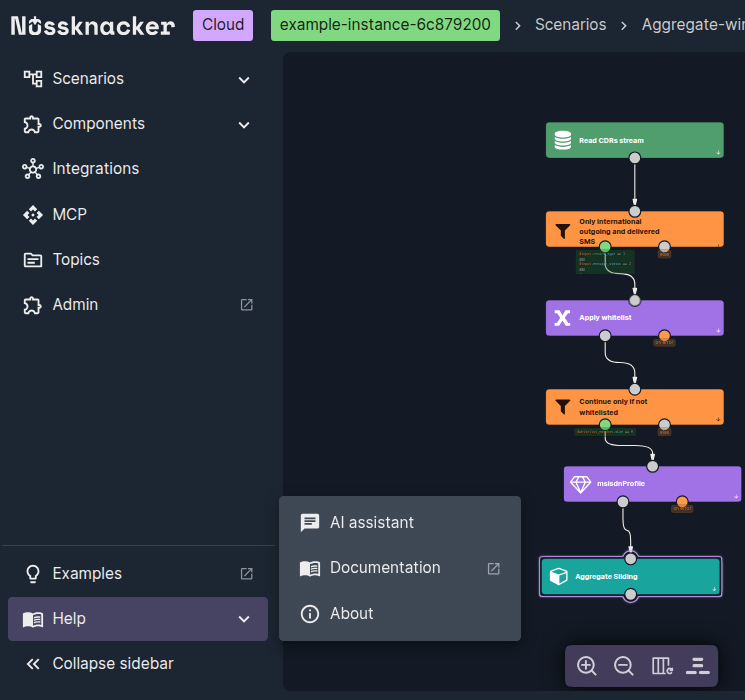
New side navigation menu.
Administration
- High availability for Nu Designer. Several Nu Designer instances can run at the same time, all serving users. One of them is elected leader for coordinated tasks such as recovering failed deployments, and if it fails, another instance takes over automatically. The mode is optional and requires PostgreSQL as the Nu Designer database. Read more
Decision models in Nussknacker: typed AI decisions for Kafka and API workflows
What if every event came with an AI answer to your own question, picked from options you define, plus how sure the model is? Nussknacker can call such models and act on the answer.
What is new in Nu - September 2026
Change Data Capture for tables, nodes with named outputs, a WebSocket Server source and live data for Request-Response.
Turn your Flink UDFs and PTFs into low-code components
Feel free to ask any questions
Nussknacker can make your data processing use case more agile and easier to manage.