Apache Flink lets you extend it with your own functions: a User-Defined Function (UDF) that masks a field, a Process Table Function (PTF) that keeps a running count per user, whatever your domain needs. In a SQL job you register them and call them by name. But SQL is only one way to reach that logic, and the people who design your data flows do not always speak it.
Nussknacker solves this by turning your Apache Flink UDFs and PTFs into low-code components which are typed, named, and ready to drop into any scenario without writing a line of SQL or glue code.
First, a quick refresher, because UDF and PTF get used loosely and people may mean slightly different things by them.
What is a UDF in Apache Flink?
A UDF (User Defined Function) is the simplest way to teach Flink a new trick. It is a plain Java (or Scala) class with an eval method. One row goes in, one value comes out. That is the whole contract.
The most common flavor is the scalar function: you extend ScalarFunction and write eval.
public class MaskFunction extends ScalarFunction {
    public String eval(String value, Integer visibleSuffix) {
        // mask everything except the last `visibleSuffix` characters
        ...
    }
}
In SQL you would register it and call it like this:
CREATE FUNCTION MASK AS 'com.example.flinkudf.MaskFunction';
SELECT MASK(email, 4) FROM customers;
That is it. A UDF is per row, stateless, and it returns a single value. Think of it as a function in the math sense: same input, same output, no memory of what came before.
Flink also has table functions (one row in, many rows out) and aggregate functions (many rows in, one value out), but when people say "UDF" they almost always mean the scalar kind.
What is a PTF (Process Table Function) in Flink?
A PTF (Process Table Function) is the heavier, more interesting cousin, introduced in Flink 2.x. Instead of looking at one row at a time, a PTF gets a whole table as an argument and can do things a scalar UDF simply cannot:
- keep state across rows (a counter, a previous value, a small cache)
- partition the input by a key, so each key gets its own independent state
- use timers
- emit as many rows as it wants per input
Here is the smallest meaningful one, a running count per partition:
public class RunningCountFunction extends ProcessTableFunction<Long> {
    public static class CountState {
        public long count = 0L;
    }
    public void eval(
            @StateHint CountState state,
            @ArgumentHint(value = ArgumentTrait.SET_SEMANTIC_TABLE, name = "input") Row input) {
        state.count++;
        collect(state.count);
    }
}
In SQL the call uses named arguments and a PARTITION BY:
SELECT * FROM RUNNING_COUNT(input => TABLE clicks PARTITION BY userId);The @StateHint is the magic word. Flink keeps one CountState per partition key for you, persists it, and hands it back on the next row. That is the difference in one sentence: a UDF forgets, a PTF remembers.
UDF vs PTF, the cheat sheet
| UDF (scalar) | PTF | |
|---|---|---|
| Input | one row | a table |
| Output | one value | zero, one, or many rows |
| State | none | yes, keyed by partition |
| Good for | enrich, transform, mask, parse | counters, dedup, sessions, previous value |
| Base class | ScalarFunction |
ProcessTableFunction<T> |
If your logic is "take these fields and compute a value", reach for a UDF. If it is "remember something about each key over time", you want a PTF.
Why registering Flink UDFs without Nussknacker is painful
Getting one of these into a running job usually means writing SQL DDL, registering the function, matching up types by hand, and making sure whoever builds the actual data flow knows the exact function name and argument order. The function lives in code, the usage lives in SQL, and the person assembling the flow lives somewhere else entirely. Three worlds that have to stay in sync by hand.
Nussknacker folds them into one. Here is the fun part.
How to use Apache Flink UDFs and PTFs as components in Nussknacker
You have two jobs: put the file (JAR) where the model can see it, and point Nussknacker at it. That is the whole setup.
1. Tell Nussknacker where to look
The easy option is a package scan. In your model config:
components.flinkSqlFunctions {
  # Auto scan: discover every UDF and PTF in these packages
  scanPackages = ["com.example.flinkudf"]
}
Drop the file on the classpath, name your packages, and every UserDefinedFunction in there gets picked up automatically. No per function wiring. Add a new function next week, rebuild the JAR, and it just appears.
Prefer to be explicit? List the functions by class instead, and give each one whatever display name you like:
components.flinkSqlFunctions {
  functions = [
    { name = "Mask",  class = "com.example.flinkudf.MaskFunction" }
    { class = "com.example.flinkudf.ThresholdAlertFunction" }
  ]
}
The two can be combined freely. Scan a package for the bulk of them, pin and rename the few that need special treatment.
2. There is no step 2
That is genuinely it. Restart, open the Designer, and your functions are sitting there as components, ready to drop onto the canvas.
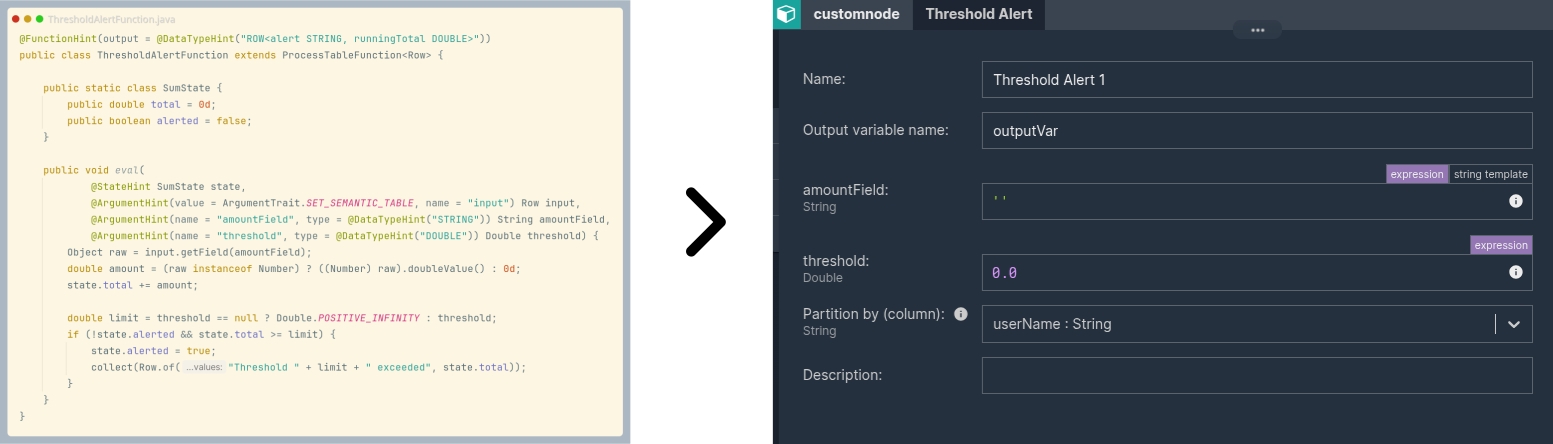
Notice a few things NU did without being asked.
It recognized what each function is. Scalar UDFs land under "User Defined Functions", PTFs land under "Process Table Functions". You did not categorize anything, Nussknacker read the Flink metadata and sorted them for you. And if those default groups do not match how your team thinks, you can rename them or regroup the functions however you like in config.
It made the names readable. ParseUserAgentFunction becomes "Parse User Agent". And if you want full control, slap a @ComponentName("Mask") on the class and that wins:
@ComponentName("Mask")
public class MaskFunction extends ScalarFunction {
    ...
}
The neat trick here is that @ComponentName is detected by reflection on its simple name, so your Java/Scala function does not need to depend on Nussknacker at all. Zero compile time coupling. Your function stays a clean Flink function.
3. The parameters type themselves
Open the Mask node in the Designer and you do not get a single "args" text box. You get real, typed parameters, one per argument, because NU can read the @ArgumentHint annotations straight out of Flink's type inference.
public @DataTypeHint("STRING") String eval(
        @ArgumentHint(name = "value", type = @DataTypeHint("STRING")) String value,
        @ArgumentHint(name = "visibleSuffix", type = @DataTypeHint("INT")) Integer visibleSuffix) {
    ...
}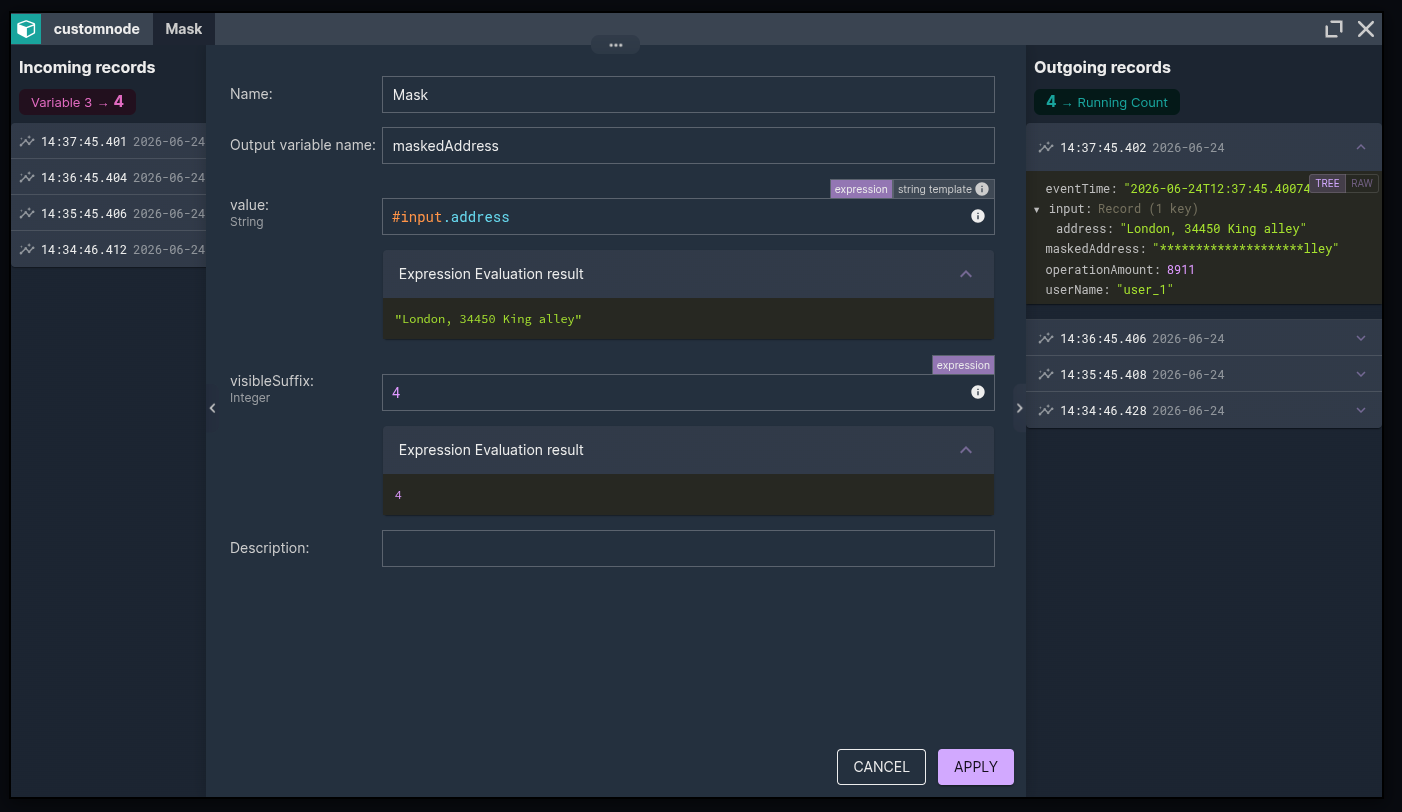
The value parameter knows it wants a String. visibleSuffix knows it wants an Int. The output type is inferred too, so the node's output variable is typed correctly and downstream nodes get full validation and autocomplete on it. It is the same mechanism the OpenAPI enricher uses, except the schema source here is Flink's own TypeInference.
4. PTFs get a partition picker
PTFs need a PARTITION BY column. Instead of asking you to type a column name and hope you spelled it right, Nussknacker offers a dropdown built from the actual upstream columns, labelled with their types.
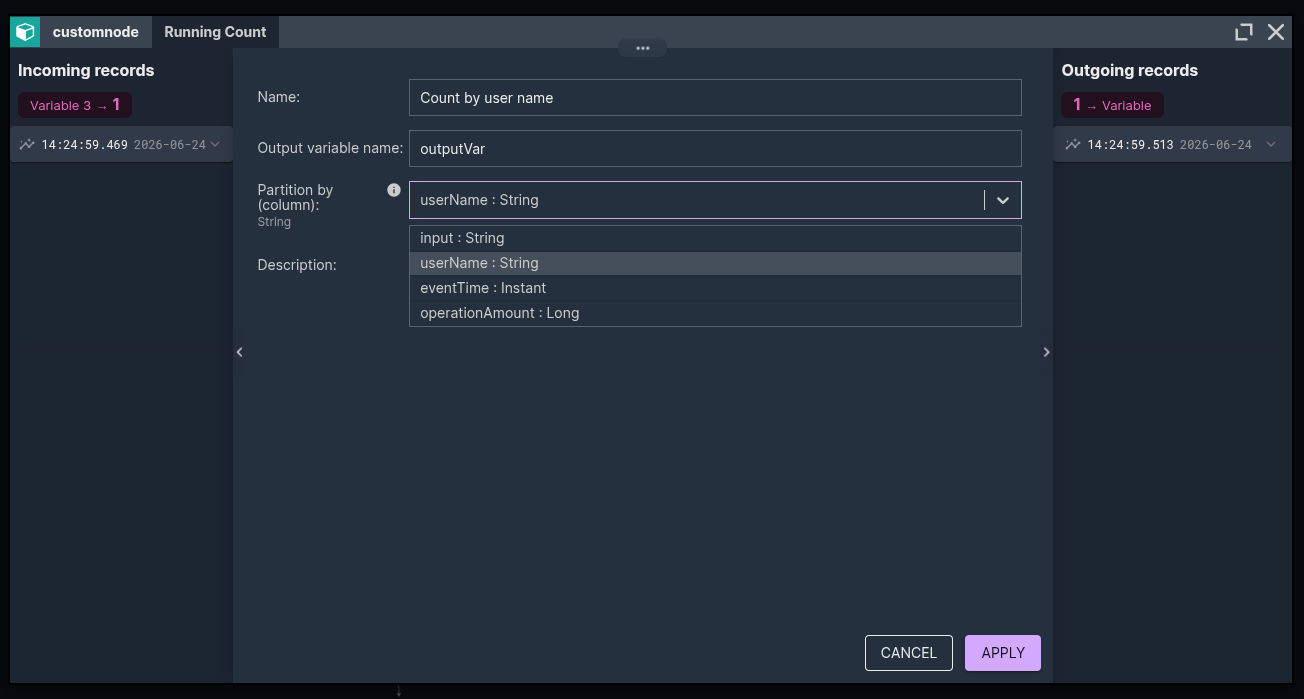
Pick the column, done. The list comes from whatever variables are in scope at that point in the scenario, so it is always accurate to that exact spot in the flow.
5. Your data still flows through
One subtle but important thing: putting a UDF in the middle of a scenario does not nuke your context. After a Mask node, #input and every other upstream variable are still right there, typed and usable.
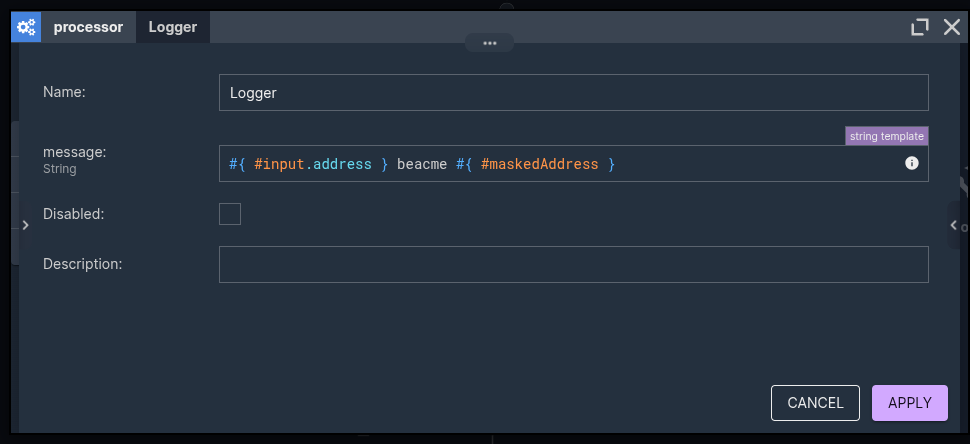
So you can mask a field, then keep using the original record for routing, enrichment, whatever. The function adds its result, it does not replace your context.
End-to-end: from Apache Flink function to low-code component in 4 steps
Already have a pile of Flink UDFs and PTFs from an existing job? Then most of this post does not even apply to you, because there is nothing to rewrite. Point Nussknacker at the JAR you already built and the migration is basically done. Your functions become components as they are.
A quick end to end flow to make it concrete:
- Write a
ScalarFunctionor aProcessTableFunction, annotate the arguments with@ArgumentHint, optionally name it with@ComponentName. - Build it.
- Drop the built jar onto the model classpath and add a
scanPackages(orfunctions) entry. - Restart, and it is a first class component in the Designer: typed, named, grouped, partition picker and all.
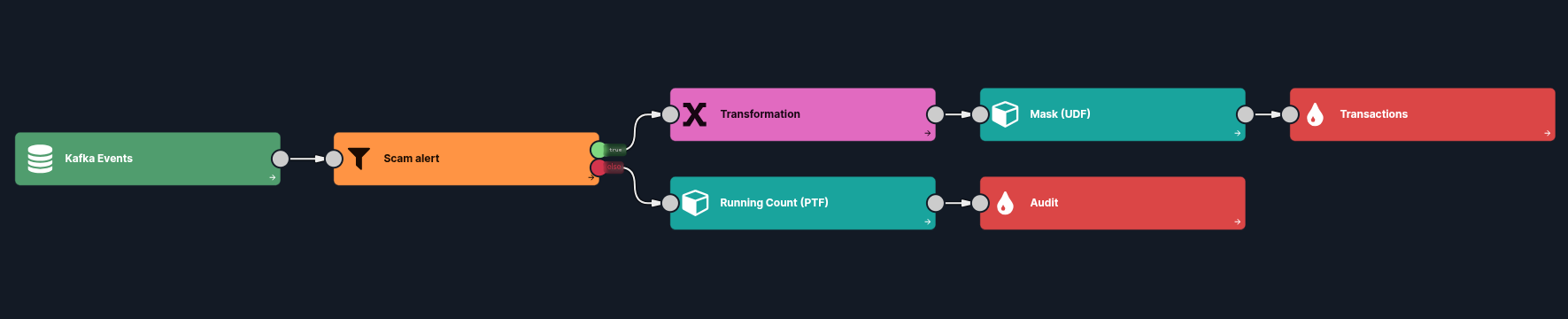
The point of all this is that the boundary between "person who writes Flink functions" and "person who builds the data flow" basically disappears. The function author writes normal Flink code with normal Flink annotations. Everyone else gets a clean, typed component. Nobody writes SQL DDL to glue the two together.
Write the function once, use it everywhere, and let NU carry the weight.
This is not the only way to extend Nussknacker. Together with the Script Processor, where you write JavaScript or Python right inside a node, you can take your logic as far as it needs to go: ship a reusable function when many scenarios need it, or drop in a few lines of script when one node needs something custom. Between bring-your-own functions and in-node scripting, Nussknacker stays easy to extend without ever leaving the flow.
If you are building real-time data flows, you might also find these useful:
- serving real-time Kafka data to AI agents through MCP
- typed structured output from LLMs in Nussknacker
Building something on streaming Flink with your own UDFs and PTFs?