Serving real-time Kafka data to AI agents through MCP
An AI agent can answer questions about your business — but how fresh is the data behind its answers? This post walks through serving real-time Kafka state to AI agents as an MCP tool, built visually in Nussknacker with no integration code.
Why fresh Kafka data matters for AI agents
An AI agent is only as good as what it's answering from. Most agents read from a warehouse or a nightly export — data that was current hours ago, not seconds ago. For a summary that's fine. For a decision about what's happening right now, it isn't.
This used to be an integration problem with no clean answer. You'd build a custom API in front of your Kafka stream, wire it to the agent, and maintain the glue in between. The Model Context Protocol (MCP) changed the second half of that: agents now have a standard way to discover and call tools. What's still missing for most teams is the first half — a tool that actually serves fresh, processed state, not raw events.
That's the gap this post is about. Not a bigger model or a smarter prompt, but the data path that keeps an agent fed with state computed from a live stream. We'll walk through a concrete architecture that does it end to end: a Kafka stream of purchase events, aggregated and classified in Apache Flink, materialized to a key-value store, and served to an AI agent as an MCP tool — built visually in Nussknacker, with no integration code.
The architecture at a glance
Here's the whole path before we go through it piece by piece. Purchase events arrive on a Kafka topic. A streaming scenario aggregates them in Apache Flink and writes the result to a key-value store. A request-response scenario reads that result, classifies it, and returns an answer. Nussknacker exposes that scenario as a tool on an MCP server, and an AI agent discovers and calls it.
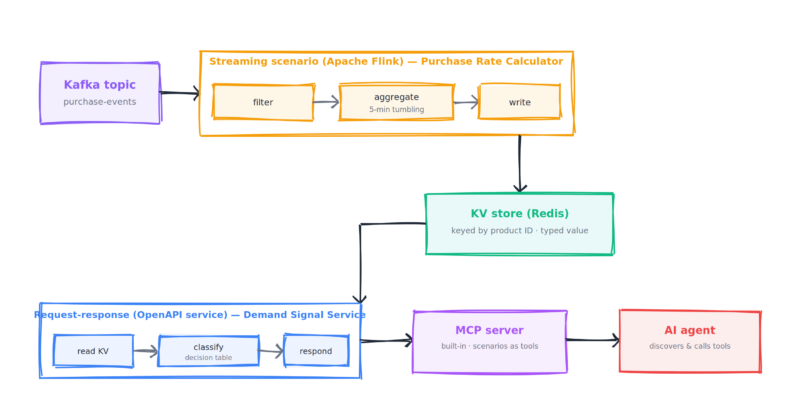
Two scenarios, not one: the streaming side computes the state, the request-response side serves it, and the KV store is the handoff between them. The rest of this post follows the data through each stage.
The streaming scenario: aggregating Kafka events in Flink
The first scenario reads the purchase stream and turns it into the state we want to serve: per product, how much is selling right now.
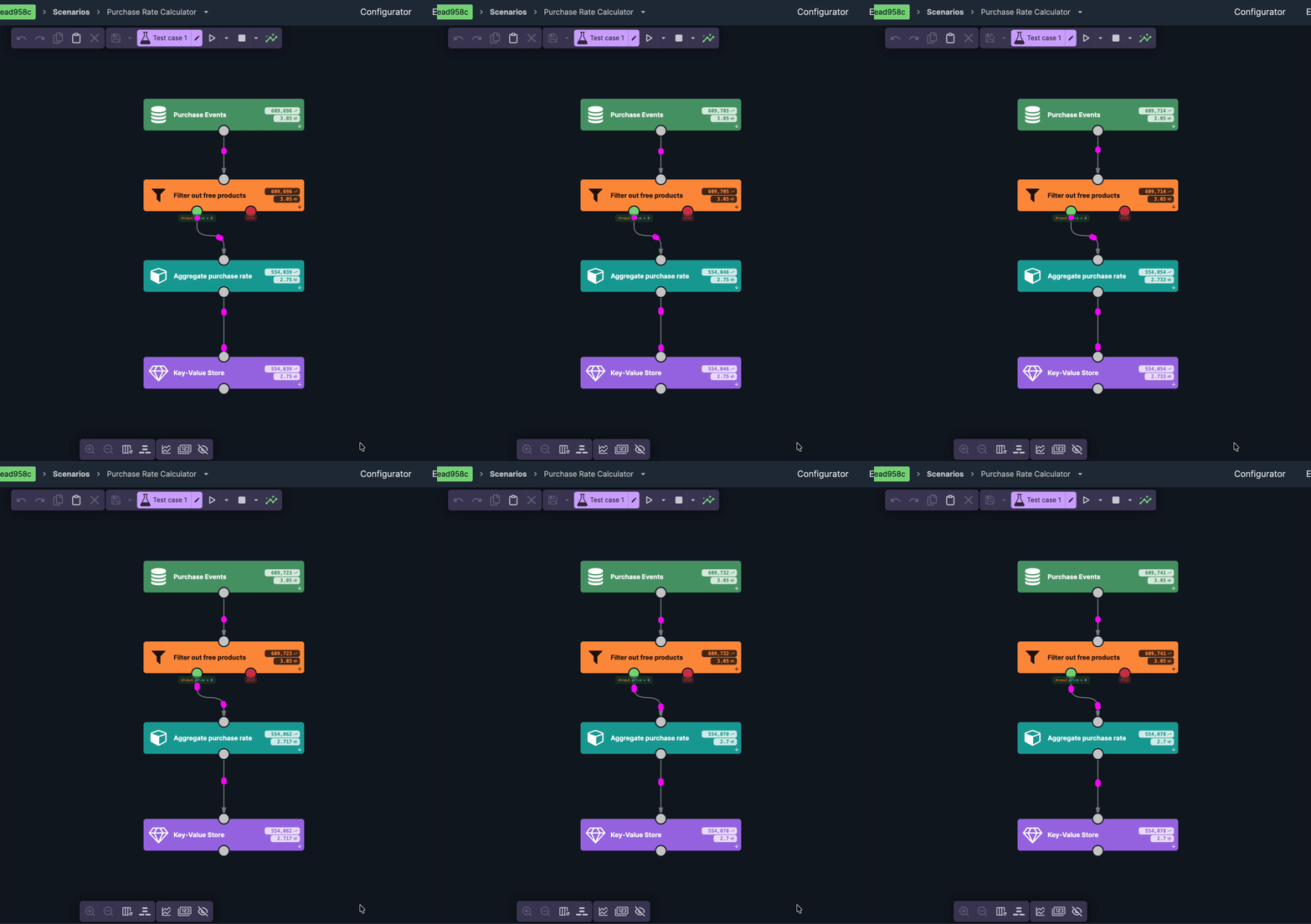
The window is the part worth slowing down on, because it decides how fresh the agent's answer can be. It's a sliding window, and in Nussknacker a sliding aggregate emits on every event — so each purchase recomputes the trailing five-minute totals for that product right away. There's no reporting interval to wait for; the moment a purchase lands, the stored value reflects it. That's what keeps the data behind the agent seconds old rather than minutes.
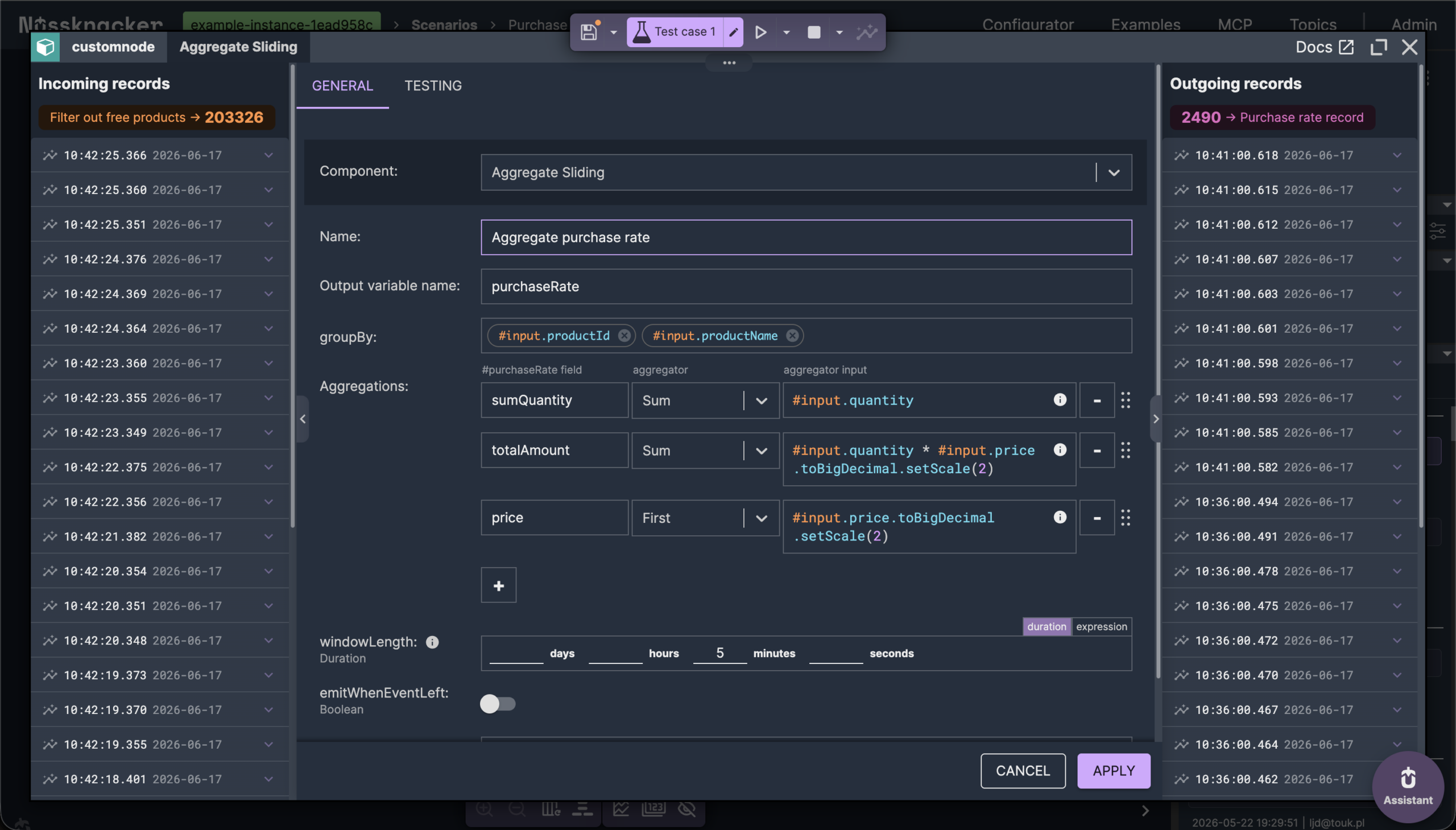
What gets written isn't a single number but a record — the quantity, the revenue, the product name, the window's timestamps — because the serving side needs all of it. That record is assembled with the data mapper rather than written out by hand.
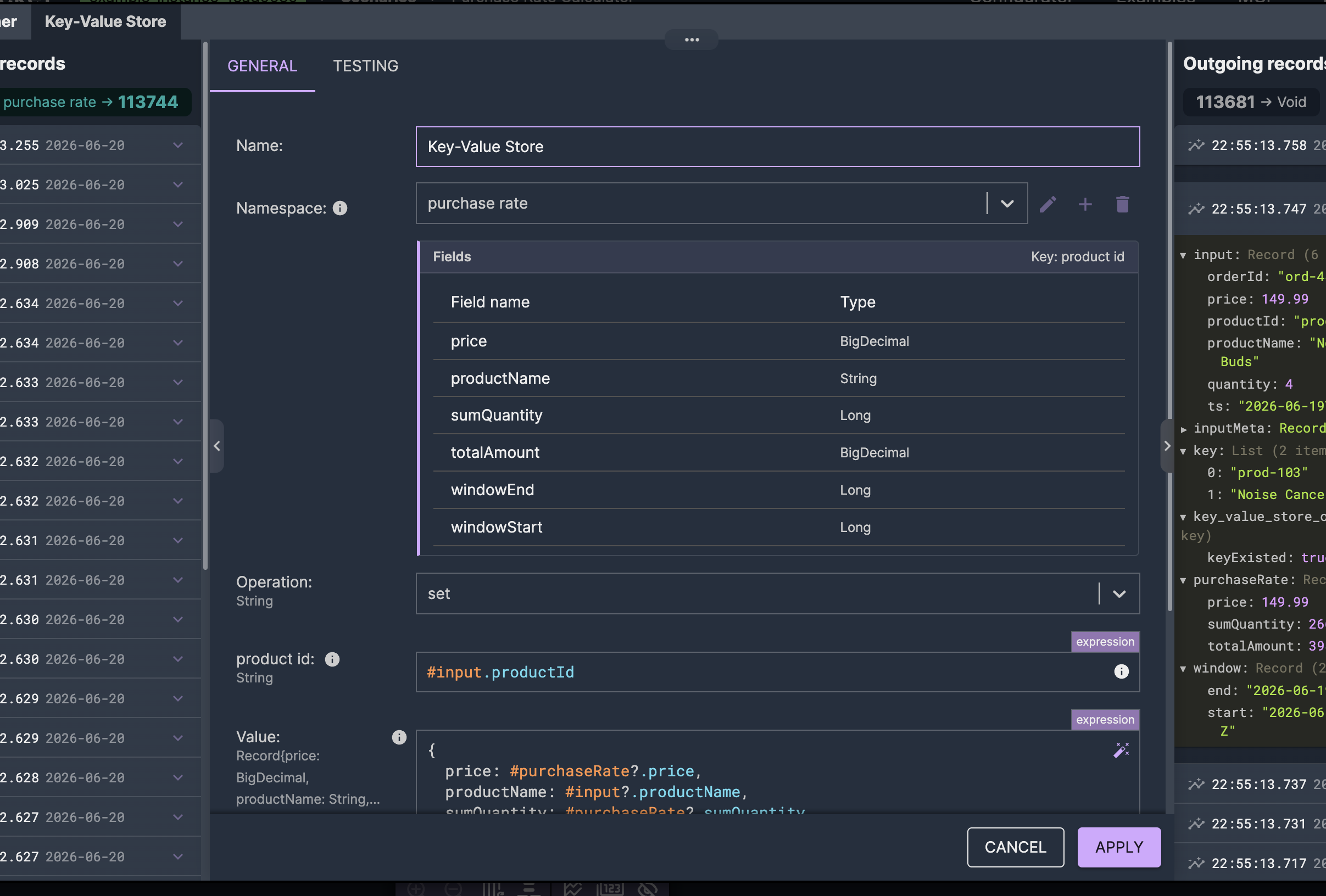
The reason the result goes to an external store is that the scenario serving the agent runs as a separate process, with no access to the streaming job's internal state. Materializing to Redis is what lets it read what the stream computed. The streaming side writes; the serving side reads; the store between them is the next piece.
The key-value store: a typed contract between scenarios
The key-value store is where the two scenarios meet. Neither references the other; they share data through a namespace, and the namespace defines its shape — a key, a set of typed fields for the value, and a TTL.
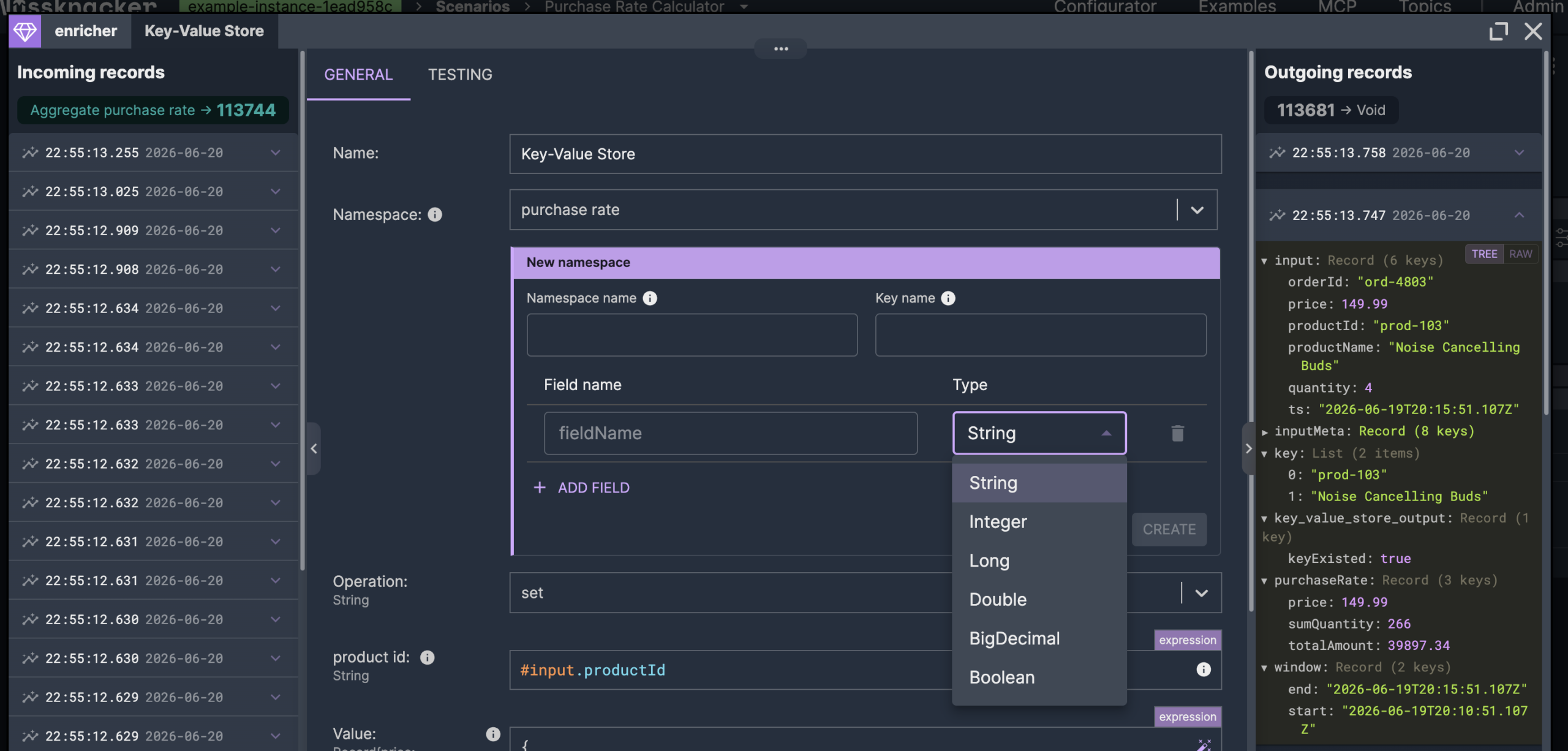
Defining the value as named, typed fields rather than an opaque blob is what makes the handoff clean: scenarios that use the namespace get the fields by name, with autocompletion and validation, and the record the streaming side wrote comes back on the other side as exactly that record. Either side can read or write — the store doesn't impose a direction; in this example the stream writes and the serving scenario reads.
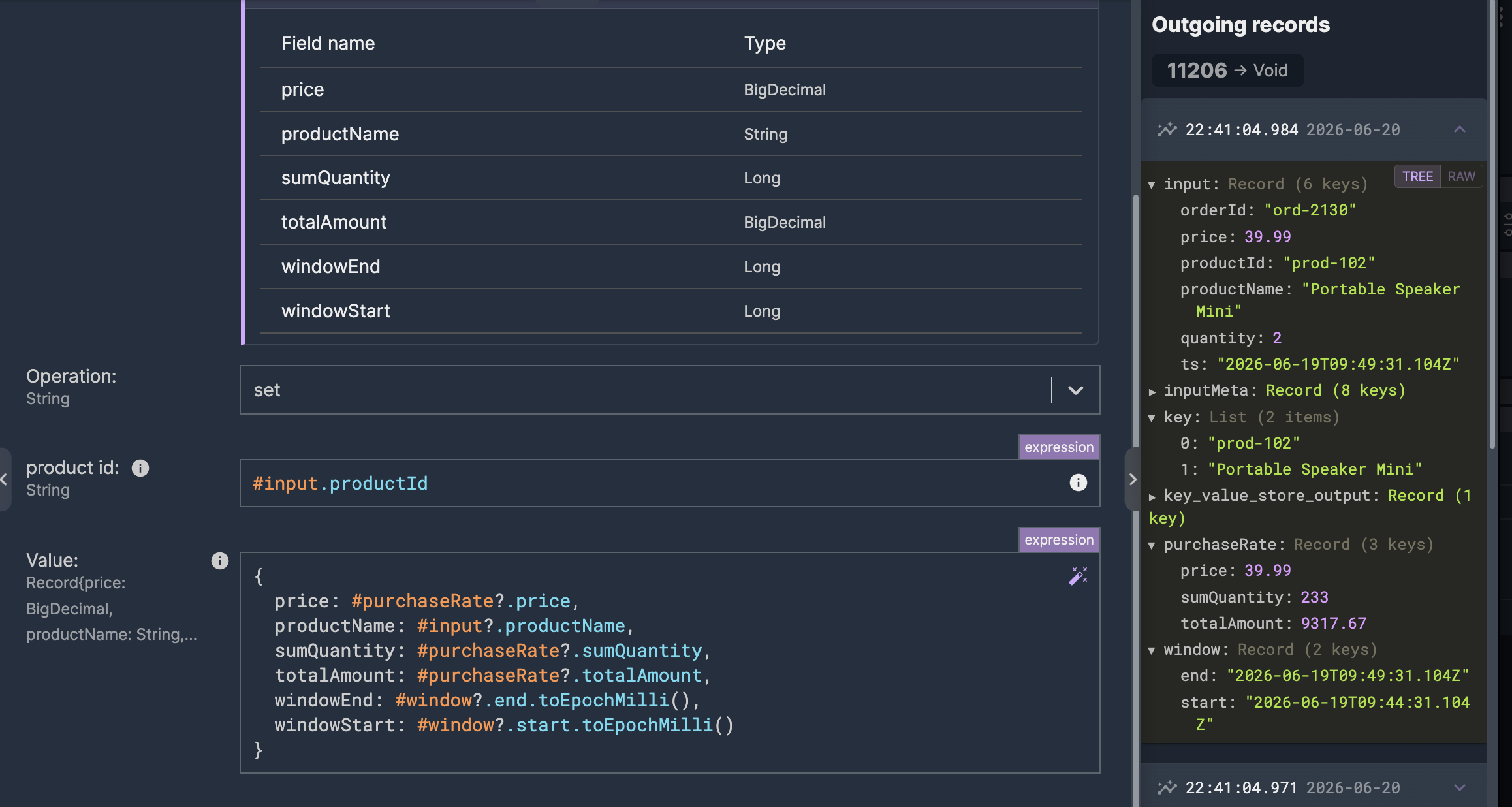
The TTL keeps the store clean: a value that isn't refreshed expires instead of lingering, so a product that stops selling ages out rather than reporting stale numbers forever.
Redis backs the store out of the box and is what we use here. The backend is pluggable, but for low-latency lookups behind an API, Redis is the natural fit.
The request-response scenario: serving logic, not data
The second scenario is what the agent talks to. It takes a product ID, reads the state the streaming side stored, turns it into a decision, and returns it.
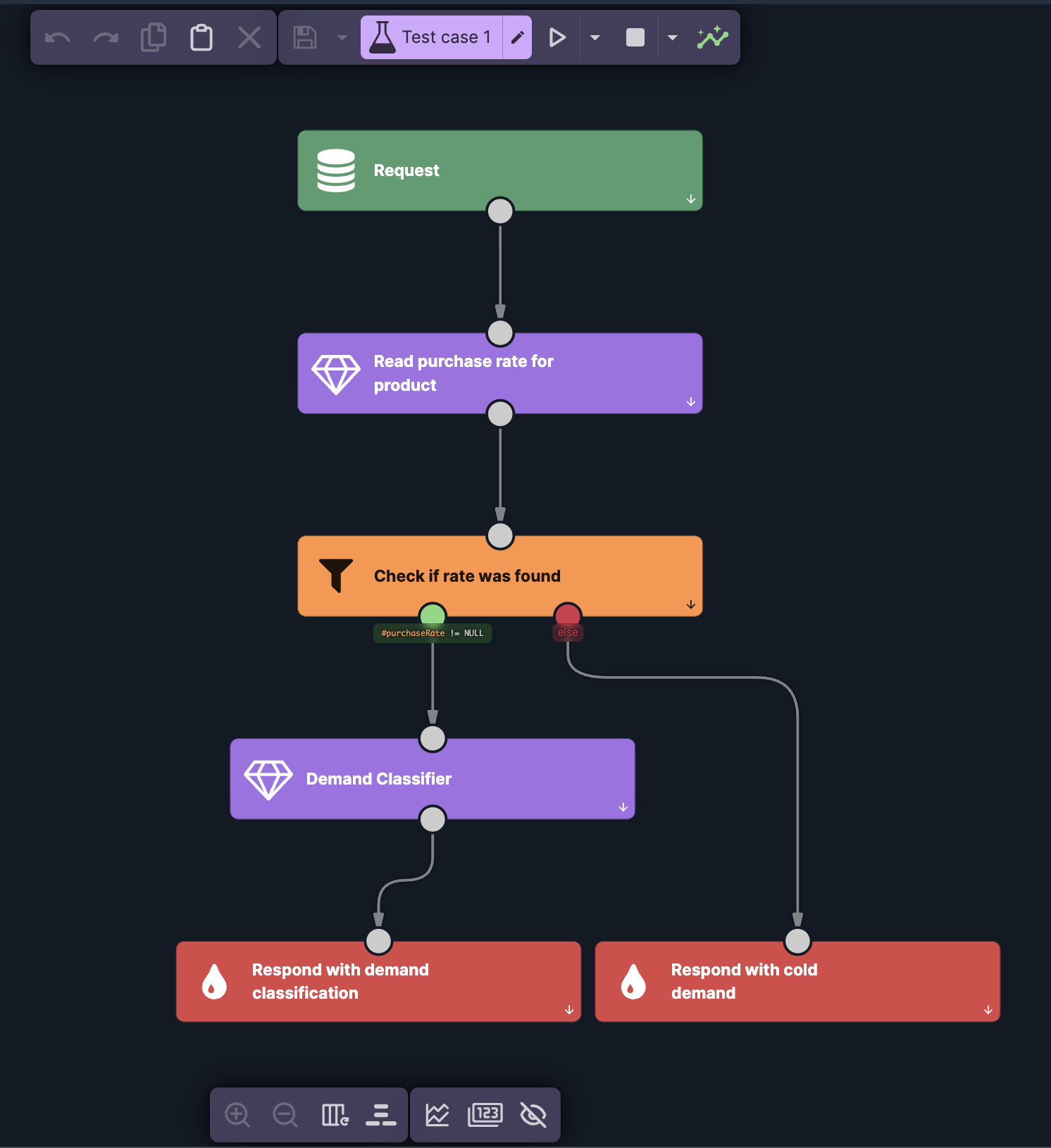
It reads from the same namespace the streaming side wrote to, so the typed fields line up on both ends with nothing to parse. The one case worth designing for is absence: a product that never sold, or whose entry has expired, isn't in the store. Rather than hand the agent a null to reason about, the scenario branches on it and returns cold demand directly — the agent always gets a well-formed answer.
This is where the difference shows. Wired straight to the stream, an agent would get raw aggregates — quantity and revenue numbers — and would have to decide for itself what counts as high demand, every time, inside a prompt. Here the scenario decides instead, in a decision table.
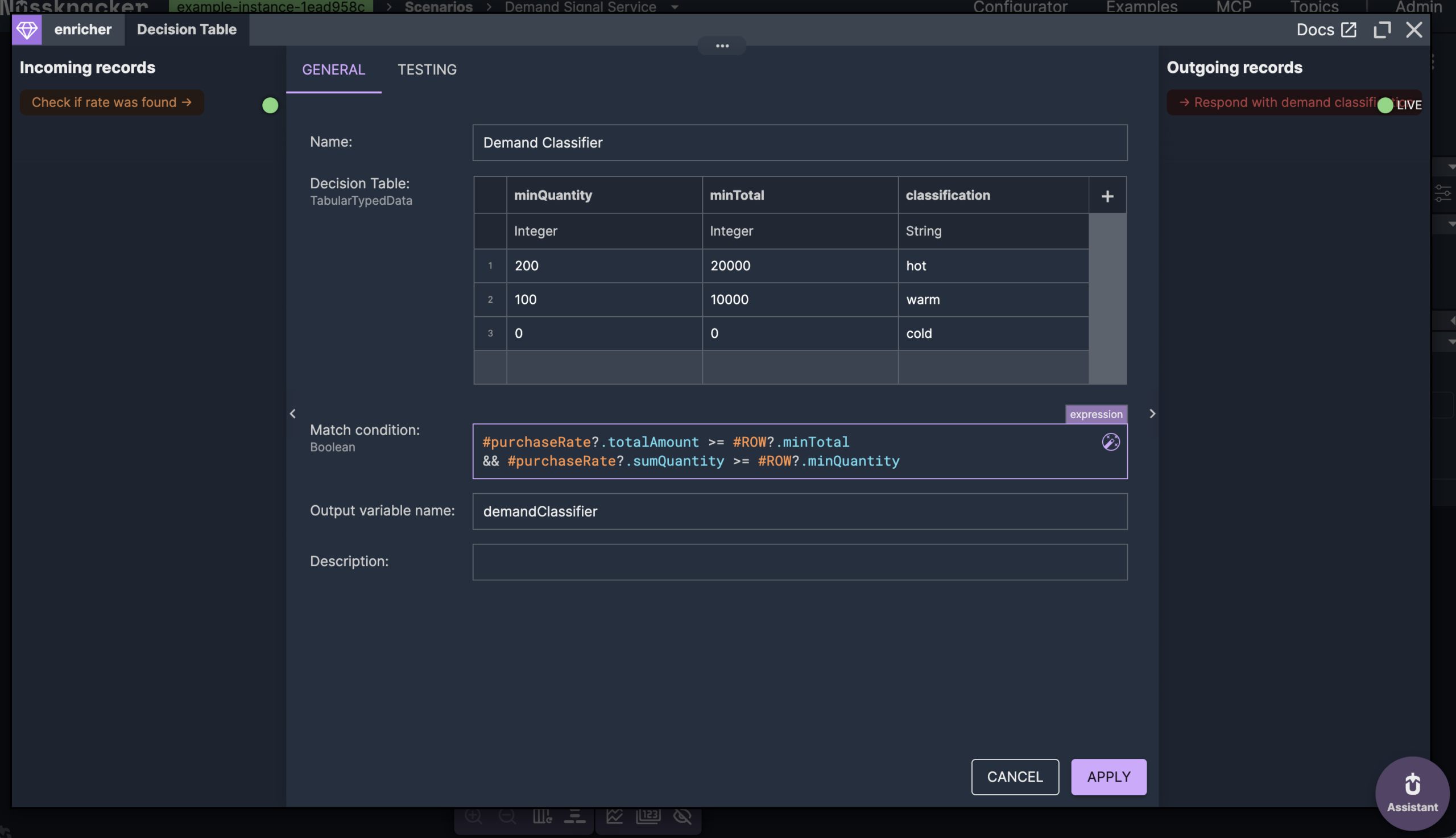
A decision table is the right tool because the policy is exactly the kind of thing that changes often and shouldn't live in code: tune a threshold by editing a row. The match condition requires a product to clear both revenue and volume, not either alone, and the first row it satisfies wins — so the order of rows is the priority order.
What the agent receives is a classification — hot, warm, or cold — not the numbers behind it. The logic for what those mean sits in one scenario, owned by whoever maintains it, instead of being restated in the prompt of every agent that asks. That's the whole point of serving logic rather than data.
From scenario to agent tool: OpenAPI and MCP
A request-response scenario already has typed input and output. That's enough for Nussknacker to generate an OpenAPI definition for it automatically — the same definition that lets any HTTP client call it, and the same one that describes it to an agent. Nothing extra to write; the schema you defined on the scenario is the contract.
The step that turns a scenario into an agent tool is a choice, not an export. You create an MCP server and pick which request-response scenarios belong to it.
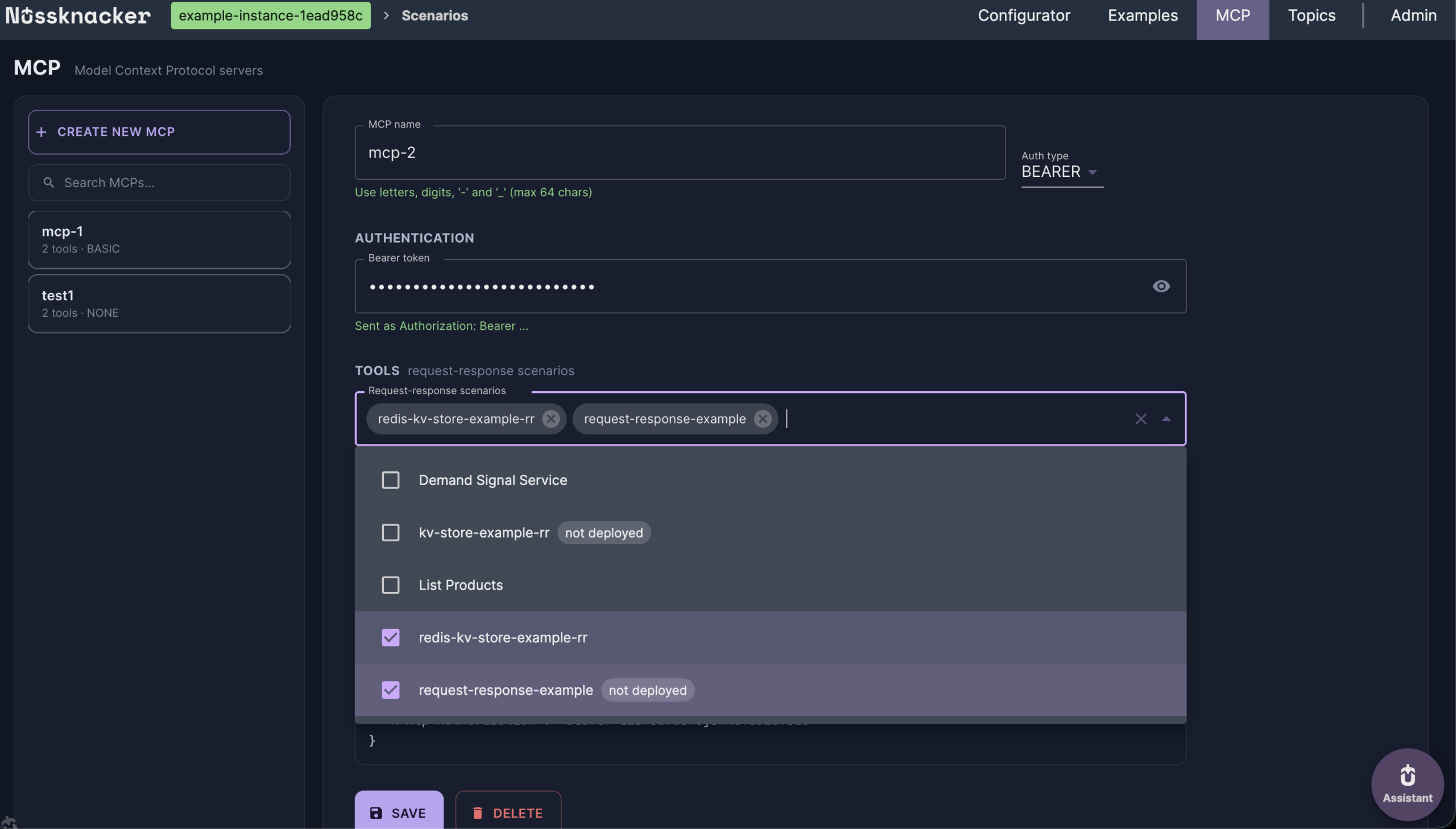
That selection is the access boundary, and it's why there's more than one server. Rather than expose every scenario through one endpoint and try to gate them with per-tool permissions, you create separate servers for separate purposes — one with read-only signals, another with scenarios that take actions — each with its own URL and its own credentials.
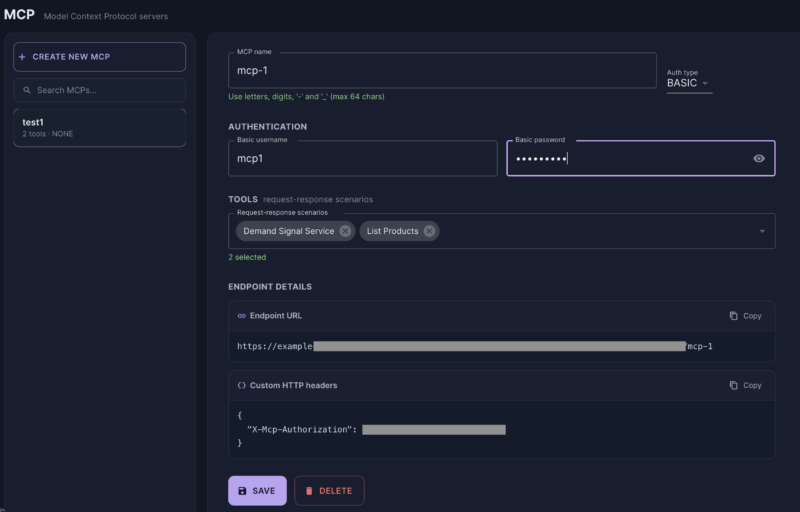
The distinction matters more than it first looks. An agent that should only read demand signals gets the URL and credentials of the read-only server. It doesn't have its permissions to the action server restricted — it has no address for it at all. Isolation by separate servers is simpler to reason about than a permission matrix, and harder to get wrong.
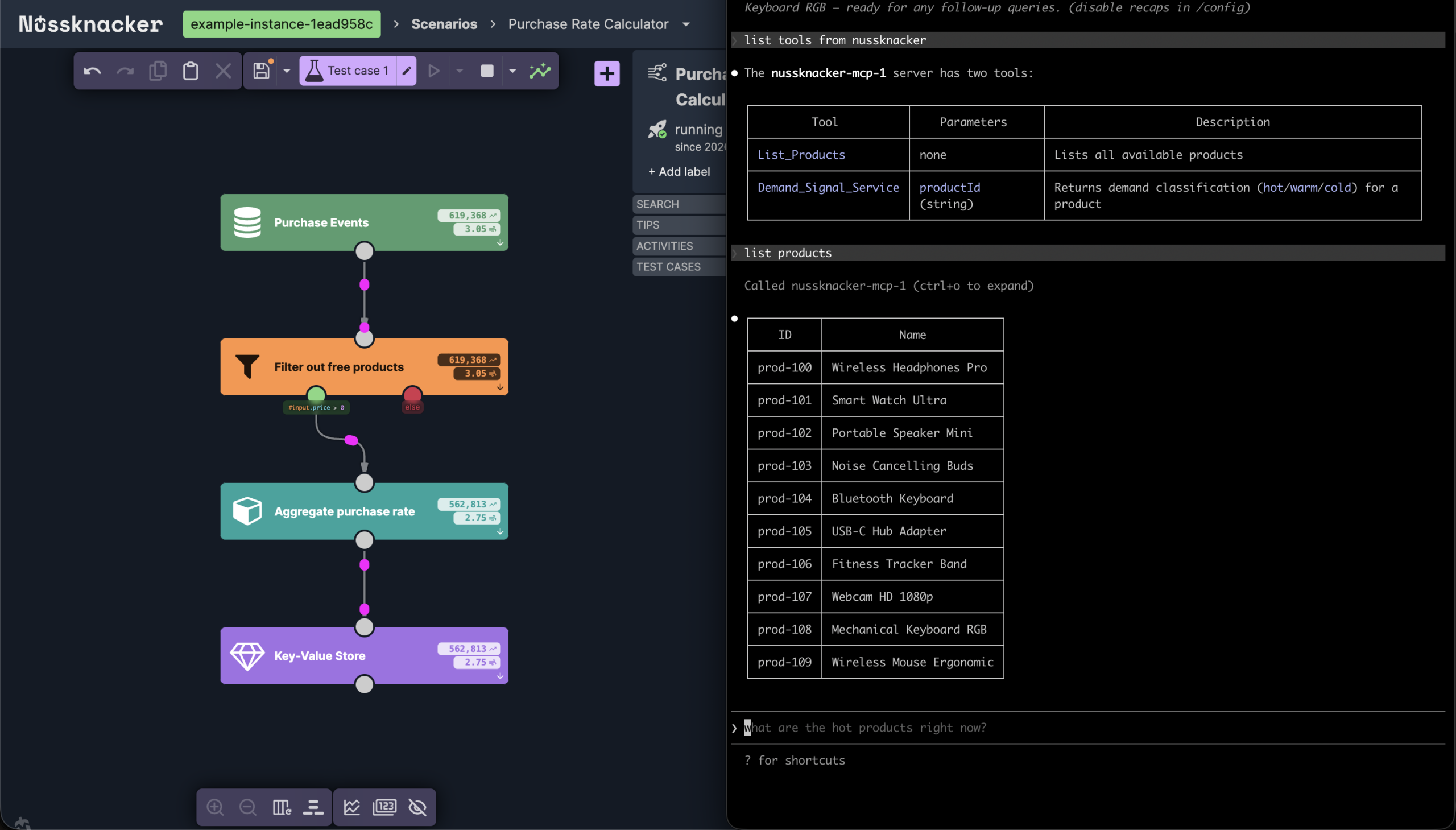
On the agent's side, none of this needs explaining. It connects to the server, lists the tools, and reads each one's inputs and description — everything it needs to call the tool on its own.
Running it on Kafka, Flink, and Kubernetes
Everything so far has been about what the scenarios do. Where they run is the part a diagram explains best.
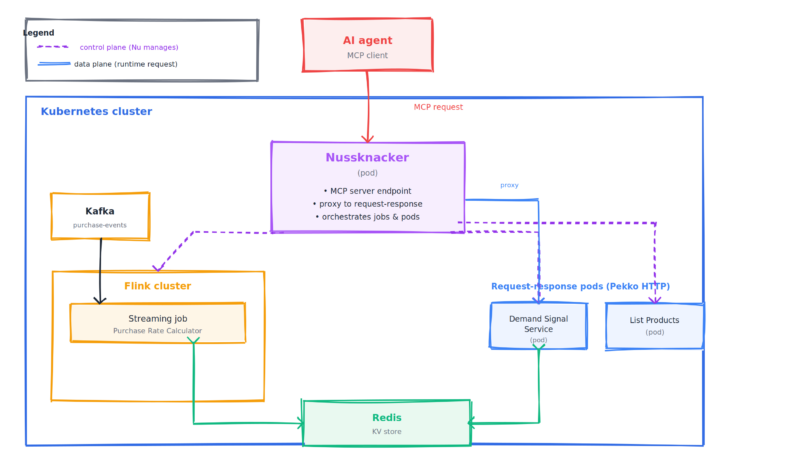
The two scenarios don't run in the same place, and that's deliberate. The streaming scenario is a long-running Flink job — it sits on the cluster and keeps computing. Each request-response scenario is a separate pod that wakes up to answer a call and is otherwise idle. These are different workloads with different scaling needs, and running them apart means each scales on its own: the Flink job for stream volume, the pods for request load, independently of each other.
Nussknacker sits in the middle of both planes. It manages the lifecycle of the Flink job and the request-response pods — that's the control plane. And at request time it's the MCP endpoint the agent connects to, proxying each call through to the right pod — that's the data plane. The agent never addresses a pod directly; it talks to Nussknacker, which is also why the access boundary from the previous section holds.
None of this asks anything unusual of your infrastructure. It's a Kafka stream, a Flink cluster, Redis, and pods on Kubernetes — the same pieces you'd run for stream processing already, with the serving layer and the MCP endpoint added on top rather than bolted on from outside.
Fresh state, not a bigger model
The thing standing between an agent and a good answer is usually not the model. It's whether the state behind the answer is current and shaped into something the agent can use. A purchase stream became a demand signal an agent can ask for on demand — aggregated, classified, and served as a tool — without an integration layer, and without the agent ever touching a raw event.
The pieces are ordinary: Kafka, Flink, Redis, Kubernetes. What changes is where the work happens. The aggregation, the classification, the freshness, the access boundary — all of it lives in two scenarios you build visually and own, with the MCP endpoint built into Nussknacker rather than wired up beside it.
If you want to point an agent at your own real-time data, we can help you set it up. Book a demo and we'll walk through it with your streams.
Decision models in Nussknacker: typed AI decisions for Kafka and API workflows
What if every event came with an AI answer to your own question, picked from options you define, plus how sure the model is? Nussknacker can call such models and act on the answer.
What is new in Nu - September 2026
Change Data Capture for tables, nodes with named outputs, a WebSocket Server source and live data for Request-Response.
What is new in Nu - August 2026
Deployment targets, the World Map component, improved enum support, improved compare versions and more.
Feel free to ask any questions
Nussknacker can make your data processing use case more agile and easier to manage.