What is new in Nu – September 2026
A monthly roundup of what changed in Nussknacker: components, integrations, Nu Designer, scenario authoring and running scenarios, with a short explanation of each. Our aim throughout: a shorter path from an idea to seeing its effect on real data.
Change Data Capture: from append-only streams to changing tables
Until now, every record entering a Nussknacker scenario was a new fact: an event appended to a stream. Many systems, however, keep their state in database tables whose rows are inserted, updated and deleted. Change Data Capture (CDC) turns those changes into a stream, and Nussknacker can now work with it end to end. (Table Source and Table Sink: Enterprise)
- Read changes from a table (Table Source). When the table definition produces a changelog, for example with the
postgres-cdcconnector or a Kafka topic indebezium-jsonformat, every insert, update and delete enters the scenario as a separate record. The new#cdcOperationvariable says what happened:INSERT,UPDATE_BEFORE,UPDATE_AFTERorDELETE, and#inputholds the row. An update produces two records: the row before and after the change. This part arrived at the end of August. Read more - Write changes to a table (Table Sink). For a table whose connector consumes a changelog, the Table Sink node has a new
CDC operationparameter, so the scenario decides whether a record inserts, updates or deletes a row. For connectors that apply changes by primary key,INSERTandUPDATE_AFTERact as an upsert. Read more - Query changing data with SQL (Flink SQL Query). The Flink SQL Query node accepts CDC inputs. When the query result itself keeps changing, for example
SELECT COUNT(*), each change comes out with its#cdcOperation, even if the input was an ordinary append-only stream. Such continuously updated results can then be written to a table with the Table Sink.
The tables themselves are defined in a Table integration.
Scenario authoring
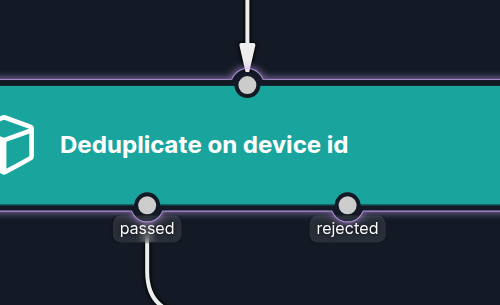
- Several named outputs from one node. A node can now have more than one output, each drawn as a separately named edge in the scenario graph. For example, the Deduplication node has a
passedand arejectedoutput, so events it filters out can be routed onwards instead of being discarded. Read more
- Improved validation messages. Each message now says what to change, names parameters by the labels you see in the node, and keeps long details, such as lists of allowed values, in a tooltip.
Integrations
- WebSocket Server source. The WebSocket source now comes in two components. WebSocket Client connects to an endpoint you point it at, as the WebSocket source always did. The new WebSocket Server lets publishers push messages to Nussknacker over a long-lived connection. The node shows the URL and credentials publishers should use, and the URL stays the same when you rename the node. Existing scenarios are migrated automatically. (Enterprise)
Testing and live data
- Live data in Request-Response scenarios. Live data, which shows the records passing through the nodes of a running scenario, now works for Request-Response scenarios too, not only for Streaming ones. Read more about live data
Working with scenarios
- Printable scenarios. Printing a scenario from the browser produces a page made for paper: the scenario's name, version and properties, the whole graph, and every node with all its parameters, including advanced ones. Printing the scenarios list gives a table of the scenarios as currently filtered and sorted.
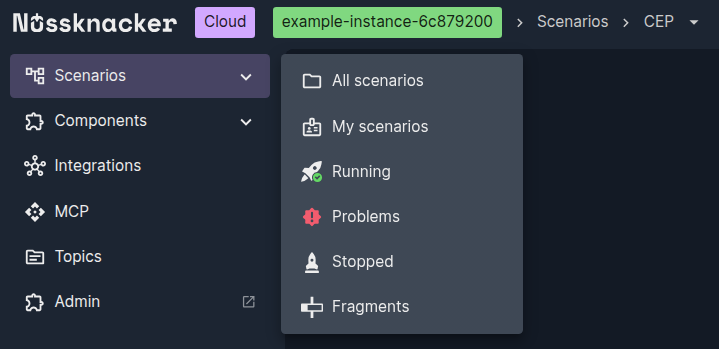
- Running and Stopped in the side menu. The Scenarios section of the side navigation menu links to all running scenarios and to all stopped ones, the latter including scenarios with problems.
Aggregates
- Missing values in aggregates. An event whose
Aggregator inputevaluates tonullis skipped, and a numeric aggregate over no values returnsnullrather than0orNaN. Read more about aggregates
Decision models in Nussknacker: typed AI decisions for Kafka and API workflows
What if every event came with an AI answer to your own question, picked from options you define, plus how sure the model is? Nussknacker can call such models and act on the answer.
What is new in Nu - August 2026
Deployment targets, the World Map component, improved enum support, improved compare versions and more.
Turn your Flink UDFs and PTFs into low-code components
Feel free to ask any questions
Nussknacker can make your data processing use case more agile and easier to manage.